
 Need help?
Do you have a question about the Camos RV-531 and is the answer not in the manual?
Details the image sensor type and resolution for the camera.
Specifies the camera's field of view in degrees.
Indicates the lowest light level at which the camera can operate.
Specifies the required power input for the camera.
Defines the range of ambient temperatures for camera operation.
States the weight of the camera unit.
Provides the physical size measurements of the camera.
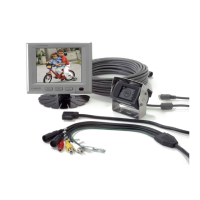
Lists all included items for camera installation and use.
Identifies the specific product model number for user reference.
Prompts users to record their product's serial number for future reference.
Explains the meaning of warning and caution symbols used in the manual.
Outlines essential safety guidelines to prevent user injury or product damage.
Provides critical instructions for safe product operation while driving.
Details warnings related to product placement, power, and handling.
Advises on suitable and unsuitable locations for product installation.
Covers safety measures for power cords and electrical connections.
Advises on safe practices for moving, cleaning, and transporting the product.
Provides essential steps and advice for safely using the product.
Lists specific safety considerations when installing and using the product in a vehicle.
Details the key functionalities and specifications of the monitor unit.
Highlights the main capabilities and design aspects of the camera.
Labels and identifies the different parts of the monitor unit.
Identifies the buttons on the remote control and their primary functions.
Explains how to turn the device on/off and switch input modes.
Describes how to control volume and adjust picture settings like brightness and contrast.
Details how to access and navigate menus, and display status information.
Instructions for turning the device power on and off.
How to switch between different video input sources (CAM1, CAM2, AV).
Explains how to mute audio and adjust volume levels.
How to select and adjust picture modes like Dynamic, Normal, Mild, or User.
How to recall previous settings or check the AV mode.
Guide on how to navigate the main setup menu and submenus.
Instructions for customizing picture settings like contrast, brightness, color, and tint.
How to set system parameters like PAL/NTSC and select display language.
Option to control camera picture orientation (Normal/Mirror).
Illustrates how to connect cables to the monitor unit.
Step-by-step instructions for mounting the monitor in the vehicle.
How to adjust the monitor's stand and viewing angle.
Steps for physically installing the camera onto the vehicle.
Details the function of each pin in the camera connector.
Instructions on how to open the remote, insert a new battery, and close it.
Comprehensive technical data for the CM-505 monitor.
Detailed technical data for the CM-32AH camera.
Introduces the CX-100 as a 2.4GHz wireless system for rear view cameras.
Lists the main benefits and functionalities of the CX-100 system.
Guidance on where to install the transmitter and receiver modules in the vehicle.
Advice on avoiding obstacles for best wireless signal transmission.
Instructions for connecting the receiver to the monitor and transmitter to the camera/tail light.
How to select channels to avoid interference using DIP switches.
Details frequency range, power, coverage, and dimensions of the CX-100.
Information on EU directives, standards, and manufacturer contact details.
 General
| Brand | Camos |
|---|---|
| Model | RV-531 |
| Category | Automobile Accessories |
| Language | English |

 To Next Page