CONTROL PANEL
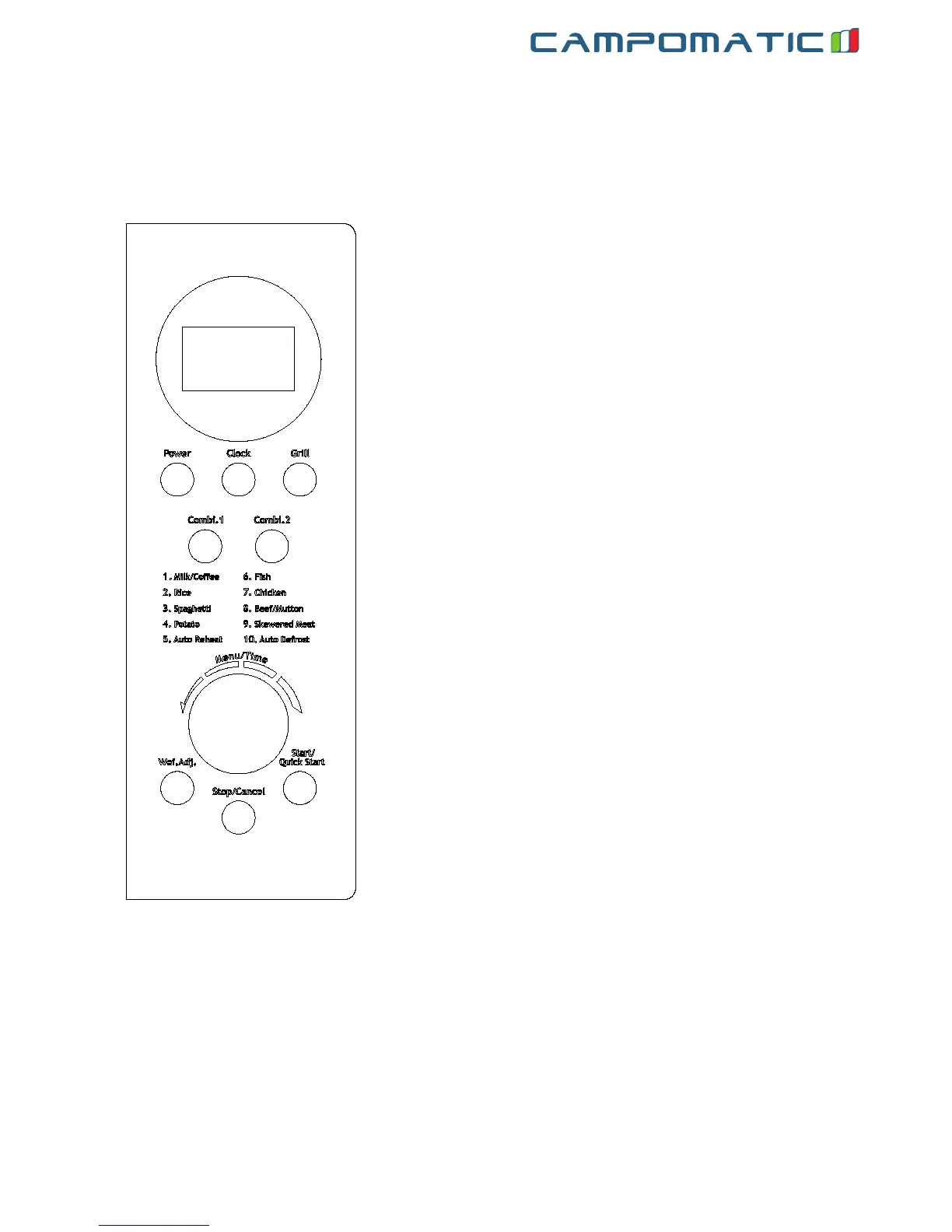
MENU ACTION SCREEN
Cooking time, power, action indicators, and clock time are
displayed.
POWER
Touch this button a number of times to set microwave
cooking power level.
GRILL
Press this button to set a grill-cooking program.
COMBI.1/COMBI.2
Cooking with combined microwave and grill power.
MENU/TIME
Turn the dial to set the oven clock time and input cooking
time.
Turn the Time/Menu dial to select an auto-cooking menu
including auto defrost.
WEI. ADJ.
After choosing an auto-cooking menu, use it to specify food
weights or number of servings.
CLOCK
Touch this button to start setting the oven clock and ending
by touching it again.
START/QUICK START
Touch to start a cooking program.
Simply touch it a number of times to set cooking time and
cook immediately at full power level.
STOP/CANCEL
Press to cancel setting or reset the oven before setting a
cooking program.
Press once to temporarily stop cooking, or twice to cancel
cooking altogether.
It is also used for setting child lock.
ENG


 To Next Page