Specifications:
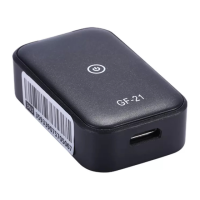
Model Number: GF-21
Material: Plastic
Size: 2.6x1.3x4.3cm
Battery: Built-in 5V 350mAh rechargeable battery
Color: Black
Charging Input: 5V
Communication frequency: 850/900/1800/1900MHz
Positioning mode: WIFI+LBS+GPS
Working Temperature: -20-85°C
FAQ
How to use the GPS tracker?
a) Prepare a nano sim card which compatible 2G network and open GPRS service (Very
important because GPS tracker only work with 2G ). lf a new SIM card, need 24 hours to
activate properly;
also need to set off the PIN code of the sim card -- very importantHAIso sim card open
GPRS internet service is required, use the internet upload location data to our server.
b) Insert the nano sim card into the tracker slot (there is a missing angle alignment for sim
card and the slot)
c) Long press the power button for 3seconds to turn on the tracker, wait yellow LED slow
flashing
d) Download our APP 365GPS, login ID: 15digits IMEI on the tracker, password: 123456
e) Test in the outdoor open sky will be helpful to get GPS satellite signal and accuracy
location.
Where are the Power button?
a) Power button: next to the sim card slot
What are the meaning of the LED lights?
Red: Battery capacity
Blue: GPS signal
Yellow: GSM signal
Fast flashing: mean search for signal (re fast mean low power)
Slow flashing: mean it's normal, work properly
Always on:
Red always on -- in charging mode
Yellow always on --
a: no sim card is inserted
b: you don't plug into the sim card correctly properly
The yellow (orange) LED light always on bright?
At first - Does your sim card support 2G GSM network? And is there 2G network service
in your house now? Only a sim card compatible with 2G works in the tracker, this is most
important! 2G sim card -- Yes! If the Yellow light always bright, mean you don't plug into
the sim card correctly and tightly, please take it out and insert again. Or you try another
new sim card into it. Yellow LED blinking is normal, please make the Yellow LED blinking.
Turn on the device, all lights blinking, APP display: Offline, the address is China?
1) The Chinese address is our company, we tested this GPS tracker before sent to you,
please don't worry about display Chinese address - it means the tracker quality test and
work properly.


 To Next Page
 Loading...