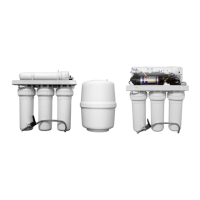
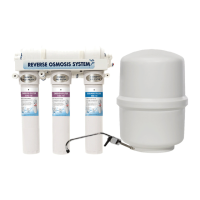
The Canature 475 PRO SERIES Reverse Osmosis System is a drinking water treatment device designed to reduce dissolved minerals, metals, and salts from water, providing great-tasting drinking water. It is available in two models, 475 and 475-BP, both offering a 75 GPD (gallons per day) output. The system is not intended for treating microbiologically unsafe or unknown quality water.
Function Description:
The system operates through a multi-stage filtration process:
- Stage 1 (Sediment SED-10): This pre-filter removes larger particles like sand, silt, and rust from the feed water.
- Stage 2 (Carbon COC-10): This pre-filter removes chlorine from the feed water, protecting the reverse osmosis membrane from damage.
- Stage 3 (TFC RO Membrane): The core of the system, this membrane reduces dissolved minerals, metals, and salts. During this process, harmful compounds are separated, and reject water is sent to the drain.
- Stage 4 (Carbon COC-10): A post-filter provides a final "polish" to ensure the dispensed water has a great taste.
Beyond the filtration stages, the system includes several key components for its operation:
- Storage Tank: Holds filtered water, ready for use. The 4.0 GAL tank can be placed conveniently, ideally within ten feet of the faucet.
- Automatic Shut-Off Valve: Senses when the storage tank is full and closes the water supply to conserve water.
- Faucet: Used to dispense RO water when needed, typically mounted near the sink.
- Feed Water Valve: Connects the system to the cold water supply line. Softened water is preferred to extend the membrane's life.
- Waste Water Saddle Valve: Connects to the drain to remove reject water from the RO system. This valve should be installed above the trap on the vertical or horizontal tailpiece.
- Booster Pump (optional for 475-BP model): Enhances water pressure for improved system performance. This model includes a solenoid valve, low pressure switch, and high pressure switch to manage pump operation.
Important Technical Specifications:
- Output: 75 GPD for both 475 and 475-BP models.
- Feed Water Pressure: 35-100 PSI.
- Temperature: 40-100°F.
- pH: 3.0-11.0.
- Max. TDS: 2000 MG/L.
- Turbidity: < 1.0 NTU.
- Max Silt Density Index: <4.0.
- Hardness: < 5 GPG.
- Iron: <0.1.
- Manganese: <0.05.
- Hydrogen Sulfide: 0.00.
- Storage Tank Capacity: 4.0 gallons.
- Mounting Surface Thickness (for faucet): Not to exceed 1-1/4 inches.
- Tubing: 3/8" for faucet and tank connections, 1/4" for supply and drain connections.
- Drain Pipe Compatibility: Standard 1-1/2" OD drain pipe for the drain saddle valve.
- Water Source: Chlorinated/Non-Chlorinated water.
- Installation Environment: Must not be installed where temperatures fall below freezing.
Usage Features:
- Flexible Installation: Can be installed under a sink, in a basement, or other suitable location with access to a potable cold water line.
- Quick-Connect Fittings: The system uses push-in quick-connect fittings for easy and secure tubing connections. Proper square cuts of tubing are essential for leak-free connections.
- System Start-Up and Flushing: After installation, the system requires a start-up procedure involving checking for leaks, turning on the feed water valve, and flushing the system by draining the tank twice. This ensures proper sanitization and prepares the system for use.
- Faucet Operation: The faucet is designed for convenient dispensing of RO water.
- Booster Pump Integration (475-BP): For installations with low feed water pressure, the booster pump model ensures optimal performance.
Maintenance Features:
- Periodic Filter Replacement: Filters must be replaced periodically for proper operation.
- Sediment (SED-10): Every 3-6 months.
- Carbon (CB-10): Every 6-12 months.
- R/O Membrane: Every 24-36 months.
- Replacement frequency may vary based on source water conditions.
- Automatic Shut-Off Device: Each filter head has an automatic shut-off device, allowing filter changes without turning off the main inlet water supply.
- Filter Change Procedure: Involves turning off the feed water saddle valve and storage tank valve, opening the faucet to relieve pressure, and then removing/reconnecting the quick-connect fittings for the filters. Expect a few drops of water during cartridge removal.
- Membrane Change Procedure: Similar to filter changes, requiring the feed water saddle valve and storage tank valve to be closed, pressure relieved, and then the membrane's quick-connect fittings removed and reconnected. After membrane replacement, the storage tank should be emptied and refilled twice to ensure proper operation.
- Leak Troubleshooting: The manual provides guidance on identifying and resolving common issues like leaks, often related to defective tubing or improper connections.
- Troubleshooting Guide: A comprehensive table helps diagnose and resolve common problems such as no product water, insufficient product water, pump not running, system not shutting off, abnormal pump cycling noise, no water to drain, or bad-tasting water. Solutions range from checking water supply and connections to replacing filters, membranes, or specific components like the drain restrictor or pressure switches.
Guarantee:
Canature North America Inc. provides a two-year warranty from the date of manufacture (or purchase with proof) for 475 PRO systems (excluding cartridge pre-filter, post-filter, and membrane) against defects in materials and workmanship under normal use and within operation specifications. The company will replace any failed part due to a defect in material or workmanship, but assumes no responsibility for consequential damage, labor, or expenses incurred due to circumstances beyond its control.


 To Next Page
 General