Candeo Zigbee Dimmer module
C203 and C204
C203
candeo
C203
candeo
C203
candeo
C203
candeo
C203
candeo
C203
candeo
C203
candeo
C204
candeo
C204
candeo
C204
candeo
C204
candeo
C204
candeo
C204
candeo
C204
candeo
C204
candeo
C204
candeo
C204
Minimum Brightness
button
Reset button
• Zigbee 3.0
• Compatible with Philips Hue, Smartthings, Hubitat, Home Assistant plus others
• Compatible with Alexa and Google Assistant if your zigbee hub supports it
• Works with multi-way physical switches, when used with retractive switches
• Minimum brightness can be set
• Supports resistive and capacitive loads
• Trailing Edge dimming
• Suitable for 10-250W LED and 10W-400W for Incandescent/Halogen lamps
• Module can be paired directly to a Touchlink remote without a hub or bridge
• Supports Find and Bind mode for Zigbee remotes
• C204 can be wired in a 2-wire system (no neutral); C203 requires neutral
Features
Specications
Input Voltage 100V-240V
Power Load 10-200VA LED @ 220V
10-400W Halogen @ 220V
Minimum load per lamp 5W with C204; 3W with C203
Minimum load per circuit 10W with C204; 3W with C203
Dimmer Control Mode AC Phase Cut
Dimensions 45.5mm x 45mm x 20mm
Please read all of the instructions prior to installation
Safety Warnings
Installation
• Turn O Mains Power before installing the device
• Do not expose the device to moisture
• Do not open the case of the dimmer
1. Turn o the power.
i. To avoid electrical shock and/or equipment damage, disconnect electrical
power at the main fuse or circuit breaker before installation and maintenance
ii. Be aware that even if the circuit breaker is o, some voltage may remain
in the wires — before proceeding with the installation, be sure no voltage is
present in the wiring.
iii. Take extra precautions to avoid accidentally turning the device on during
installation.
2. Connect the device according to the diagrams shown below for either
a 2-wire system (C204 only) or 3-wire system (C203 or C204).
C203
candeo
C203
candeo
C203
candeo
C203
candeo
C203
candeo
C203
candeo
C203
C203 - wiring C204 - wiring
C204
candeo
C204
candeo
C204
candeo
C204
candeo
C204
candeo
C204
candeo
C204
candeo
C204
candeo
C204
candeo
C204
candeo
C204
• Bypass is optional but recommended
for no-neutral wiring
Basic no-neutral wiring
Basic wiring with neutral wire
candeo
C204
C203
candeo
C203
candeo
C203
candeo
C203
candeo
C203
candeo
C203
candeo
C203
C203
candeo
C203
candeo
C203
candeo
C203
candeo
C203
candeo
C203
candeo
C203
Notes for the wiring diagrams:
L - terminal for Live lead
N - terminal for neutral lead
Out - output terminal to light
+A1 - terminal for push switch
+A2 - terminal for grounding to the
switch connected to the dimmer.
Basic set up without retractive switches
Wiring with retractive switches
Notes for the wiring diagrams:
L - terminal for Live lead
N - terminal for neutral lead
Out - output terminal to light
S1 - terminal for push switch
COM - terminal for grounding to the
switch connected to the dimmer.
Multi-switch wiring
1. The C203 and C204 modules can be physically activated using
either a single push/retractive switch, or multiple switches in a multi-way
conguration.
i. Pressing once toggles the lights on/o; and holding the switch activates
dimming.
ii. Toggle/rocker switches are not supported.
2. (C204 only) Using a LED bypass on no-neutral wiring systems is
optional but recommended, as it:
i. will prevent ickering at low levels, and prevent low level glowing when
switched o.
ii. reduces the minimum load required by the dimmer for optimal operation.
Notes

 Need help?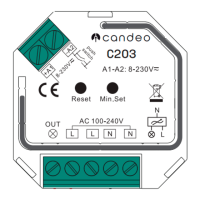

 To Next Page
 General