7. QUICK USER GUIDE
This appliance automatically adjusts the
level of the water to the type and quantity of
washing. This system gives a reduction in
energy consumption and a saving in
washing times.
Turn on the appliance and select the
required program.
Adjust the washing settings if necessary
and select the required options.
Press the programme start button.
The end of the programme will be
indicated by a message on the display
(on some models, all the indicator lights
on the stage will light up).
Turn off the appliance.
For any type of wash, see the program
table and follow the operating sequence
as indicated.
Water pressure:
min 0.1 Mpa / max 1 Mpa
Spin r.p.m.: See rating plate.
Power input / Power current fuse amp /
Supply voltage: See rating plate.
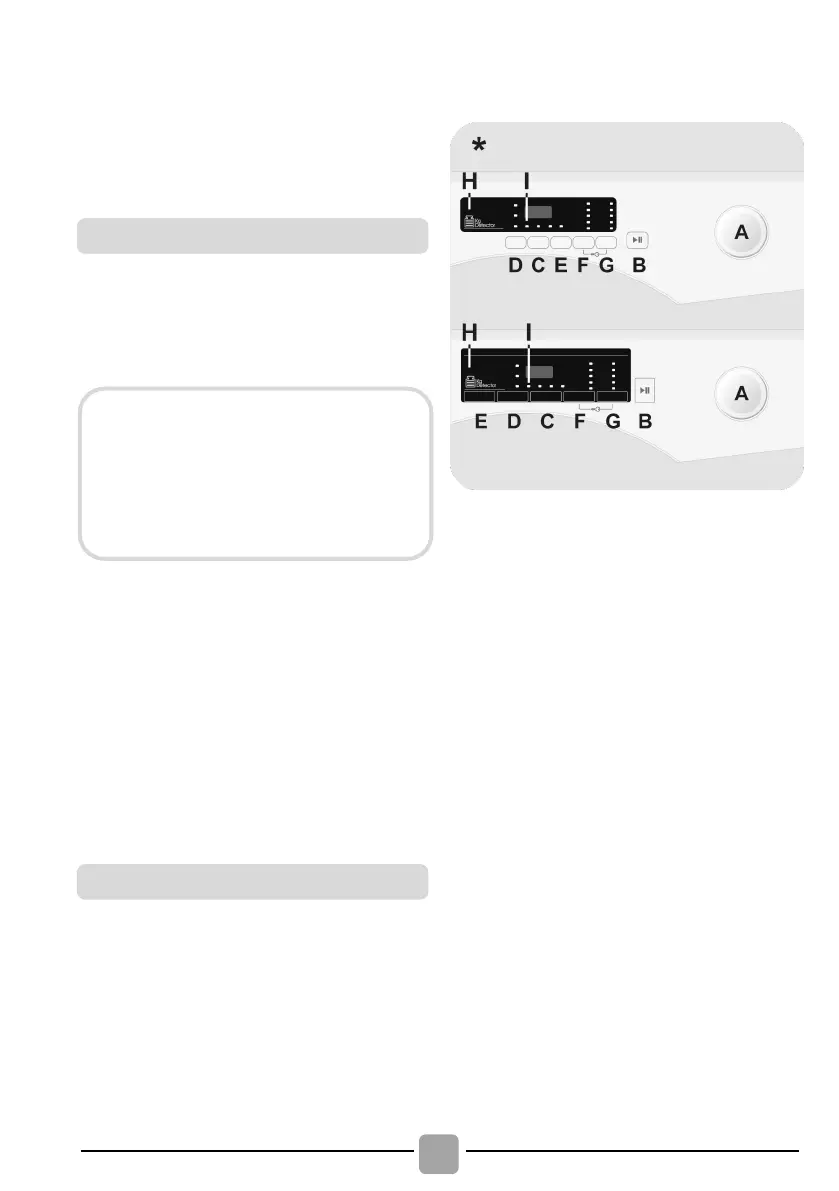
8. CONTROLS AND
PROGRAMS
* Depending on model
Programme selector with OFF
position
STAIN LEVEL/RAPID/STEAM
LEVEL button
**
TEMPERATURE SELECTION
button
DOOR LOCKED indicator light
**STEAM LEVEL
(only available on certain models)
DRYING (WASHER-DRYERS only)
If you would like the drying cycle to
begin automatically after washing,
select the washing programme
required and select the drying cycle.
Or you can finish the wash and then
select the drying programme.



 To Next Page