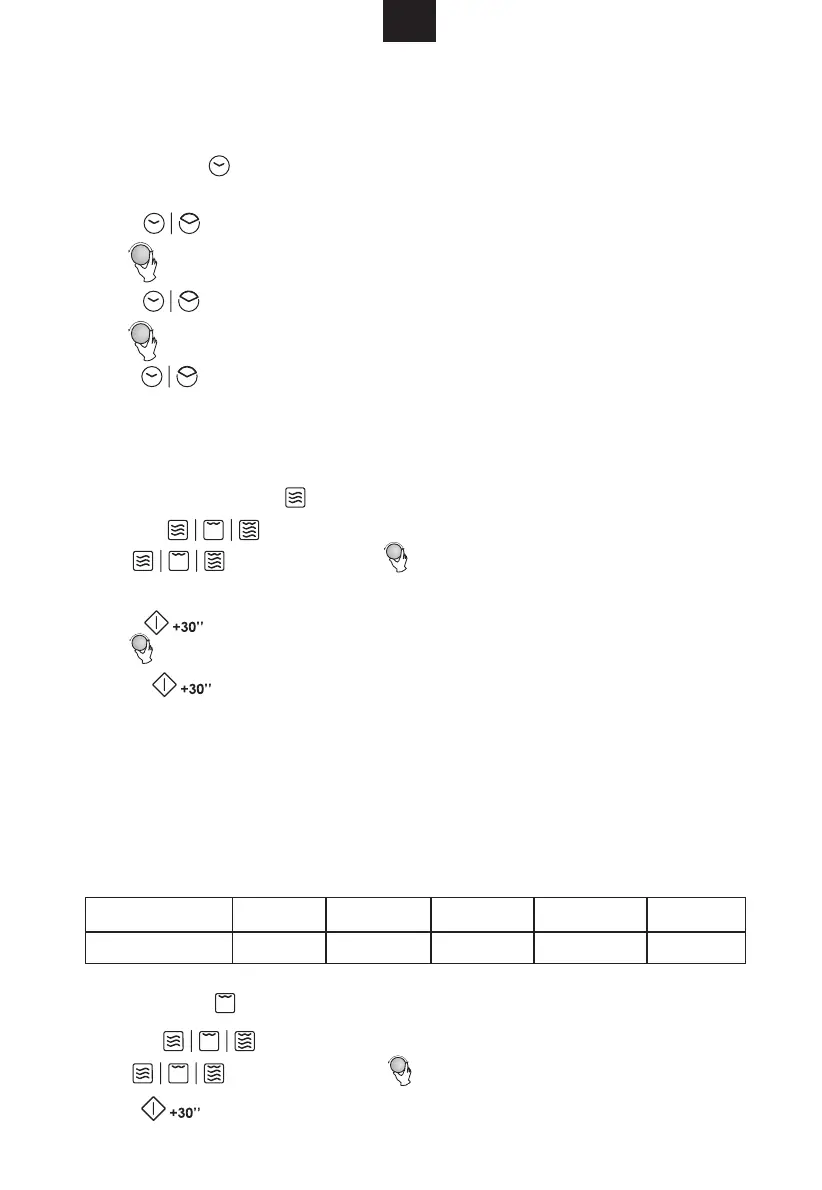
3.Grill Cooking
2. Microwave Cooking
This microwave oven uses modern electronic control to adjust cooking parameters
to meet your needs better for cooking.
When the microwave oven is electrified,the oven will display "0:00", buzzer will ring once.
2) Turn " " to adjust the hour figures, the input time should be within 0--23.
3) Press "
", the minute figures will flash.
5) Press " " to finish clock setting. ":" will flash.
Note: 1) If the clock is not set, it would not function when powered.
2) During the process of clock setting, if no oppreation in 1 minute, the oven
will go back to the previous status automatically.
1) Press " ", the hour figure flash;
OPERATION INSTRUCTION
NOTE: the step quantities for the adjustment time of the coding switch are as follow:
0---1 min : 5 seconds
1---5 min : 10 seconds
5---10 min : 30 seconds
10---30 min : 1 min
ute
30---95 min : 5 minutes
Microwave Power Chart
4) Turn " " to adjust the minute figures, the input time should be within 0--59.
1) Press the " " key once, and "P100" display.
1) Press the " " key once, and "P100" display.
2) Press "
"P80", "P50", "P30", "P10" will display in order.
3) Press "
" to confirm.
4)Turn " " to adjust the cooking time. (The time setting should be 0:05- 95:00.)
5) Press "
" to start cooking.
2) Press " " for times or turn " " to select the grill power .
3) Press " " to confirm when the LED display "G".
Microwave Power
560W 350W
210W
70W700W
Display
P100
P80 P50 P30 P10
1.Clock Setting
" for times or turn " " to select the microwave power "P100",
GB
,


 To Next Page