51
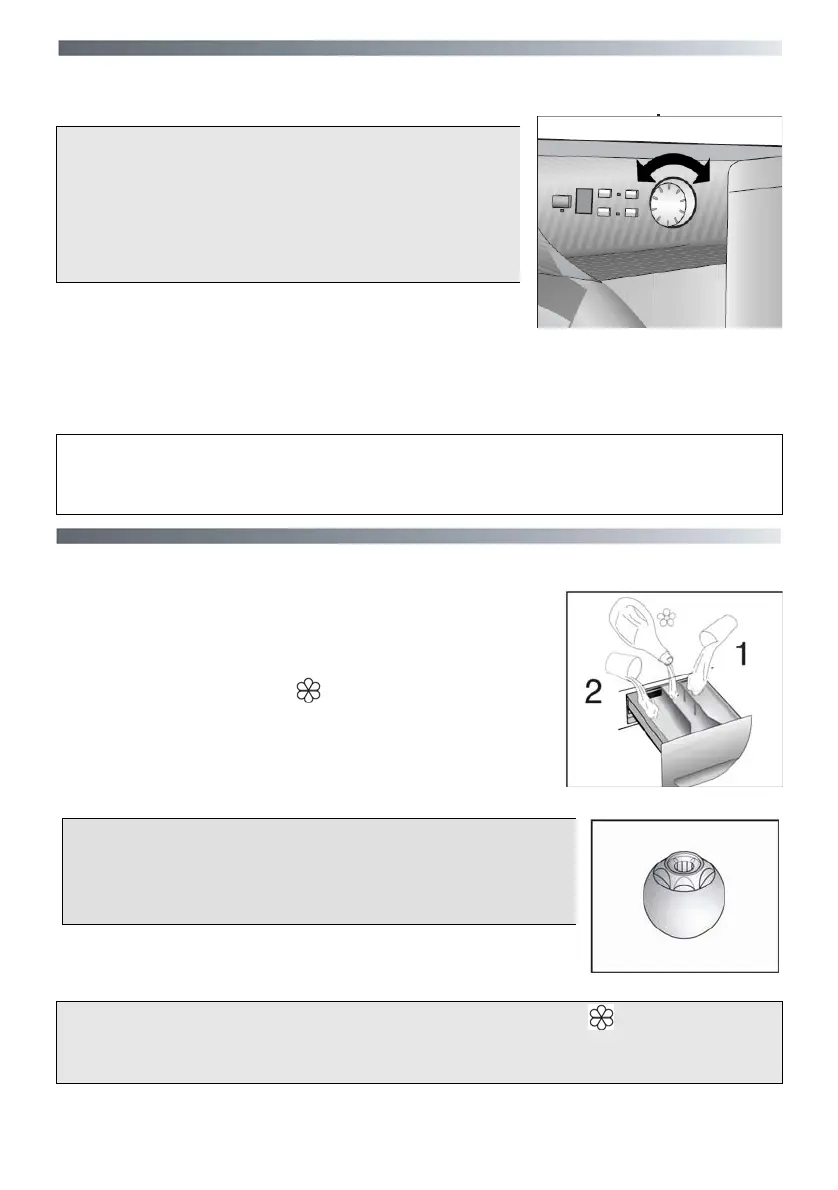
Program selector with "OFF" position N
Rotates in both directions.
The machine is turned on by selecting a program
via the program selector.
When the program selector is turned the display
lights up to show the settings for the program se-
lected.
Press the "Start/Pause" button to start the selected cy-
cle.
The program carries out with the program selector stationary on the selected program till
cycle ends.
Switch off the washing machine by turning the selector to "OFF".
NOTE: The program selector must be return to the off position at the end of each
cycle or when starting a subsequent wash cycle prior to the next program being
selected and started.
Detergent drawer P
The d
etergent drawer is split into 3 compartments:
- the compartment labeled "1" is for prewash detergent;
- the compartment labeled " " is for special additives,
fabric softeners, fragrances, starch, brighteners etc;
-
the compartment labeled "2" is for main wash detergent.
NOTE:
Some Detergents are Difficult to utilise. Ensure to use an
in drum dispenser if recommended by the detergent
Manufacturer.
NOTE: only put liquid products in the compartment labeled “ ”. The machine is
programmed to automatically take up additives during the final rinse stage for all
wash cycles.




 To Next Page