En
Fr
De
It
Es
Ca
Eu
Pt
El
Da
Nl
No
Sv
Fi
Ru
Uk
Lv
Lt
Et
Pl
Cs
Sk
Sl
Hr
Hu
Ro
Bg
Tr
Ar
Fa
3
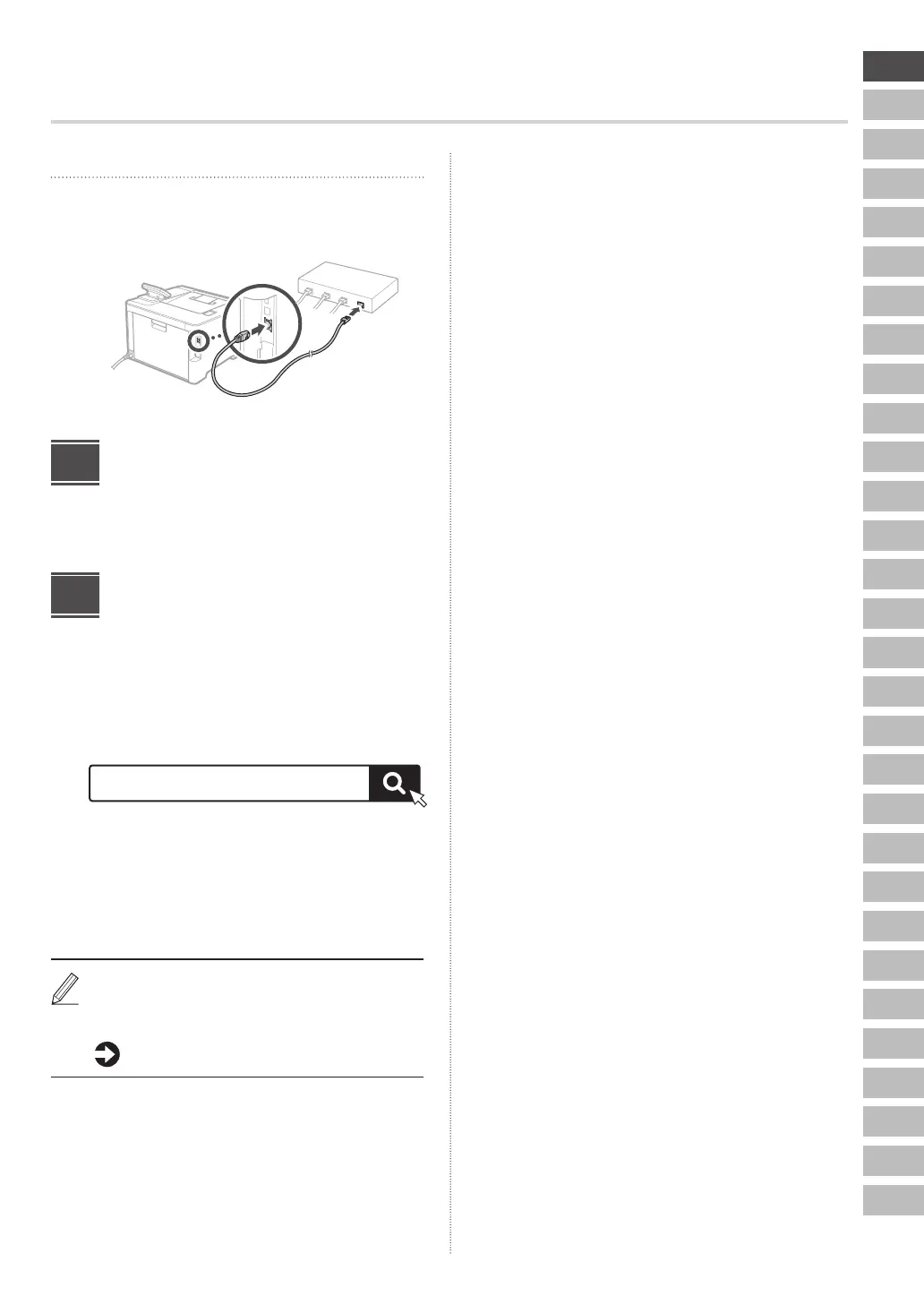
Wired LAN
Connect the router to the machine with a LAN cable and
then select <No> in the screen for choosing how to
connect to the network.
Rear
Ending the Setup Guide
Check the description in the Application Library and then
select <End>.
Installing the Software/
Drivers
To use the print function of the machine, you must install
the printer driver.
1. Search for “(model name) download.”
Example: C1333P download
XXXXXXX download
If you cannot find the download site, go to
https://global.canon/en/support/
2. Download the software and drivers, and
install them on your computer.
If a problem arises during the installation, see “See
Troubleshooting (FAQ) for drivers” in “FAQ.”
Accessing the FAQ
p. 4 “Accessing the Online Manual”
4
5











 To Next Page