En
Es
Fr
Pt
3
1 2 3 4 5 6 7 12
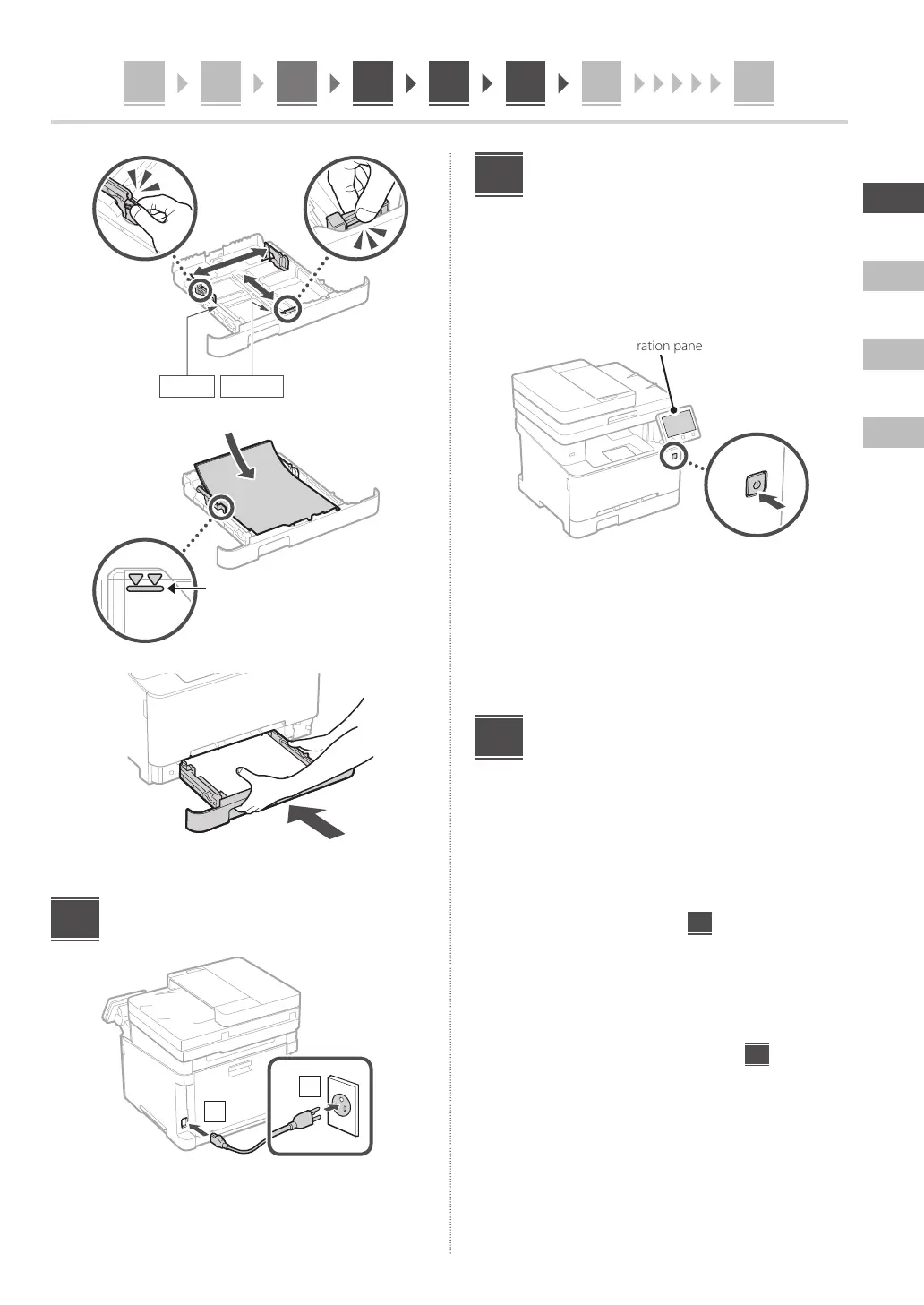
2.
A4/A5
A4/LGL
3.
Ensure that the amount of paper
loaded is not above this line
4.
Connecting the Power Cord
1
2
4
Specifying the Basic
Settings
When you turn on the machine for the first time, the
Setup Guide appears on the operation panel. Perform
the initial machine setup by following the on-screen
instructions.
Operation panel
1.
Select the language, then the country/
region and finally the time zone.
2.
Set the current date/time.
Specifying the Security
Settings
Specify the basic security settings to prevent unauthorized
access to the machine.
1.
To use the Remote UI, select <Yes>.
To continue without using the Remote UI, select
<No> and proceed to step
7
.
2.
To use General User mode, select <Yes>.
• Set the PIN to be used by general users to access
the Remote UI.
• To continue without using General User mode,
select <No> and proceed to step
7
.
3.
Set the Remote UI Access PIN.
• Enter any number and then select <Apply>.
• Re-enter the same PIN on the next screen as
confirmation and select <Apply>.
5
6





 To Next Page