EasyManua.ls Logo

Canon Connect Station CS100 - User Manual

Canon Connect Station CS100
11 pages
Print Icon
To Next Page IconTo Next Page
Loading...
The descriptions in this Instruction Manual are current as of February 2015.
Forinformation on the compatibility with any products introduced after this date,
contact any Canon Service Center.
Interface or functions of this product are subject to change for product improvement
or firmware update. In such a case, sample screens or operation instructions in this
manual may differ from the screens or operations on the actual product.
For the Instruction Manual reflecting the improvement or firmware update refer to
Canon website.
Connect Station CS100
Get started
EN
CS
DA
DE
ES
ET
FI
FR
HU
IT
LT
LV
NL
PL
PT
SK
SV
KK
RU
UK
EL
AR
CEL-SW2HA210
Question and Answer IconNeed help?

Do you have a question about the Canon Connect Station CS100 and is the answer not in the manual?

Overview

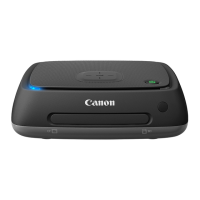
The Canon Connect Station CS100 is a device designed for easy storage, enjoyment, and sharing of photos and videos at home. It allows users to transfer media from various sources, view them in Full HD on a TV, and share them online.

Function Description:

The primary function of the Connect Station CS100 is to act as a central hub for managing digital media. It facilitates:
  • Importing: Users can import images and videos from NFC-compatible Canon cameras/camcorders with a single tap, upload from phones or tablets, or transfer directly from memory cards (SD/SDHC/SDXC and CF cards) and USB-connected cameras/camcorders. It also supports importing via a wired LAN connection or a web browser.
  • Viewing: Stored images and videos can be viewed in Full HD on a connected TV. The device organizes media by shooting month, camera/camcorder, or into user-created albums.
  • Sharing: The CS100 integrates with Canon Image Gateway and other SNS (Social Networking Services) for online sharing. It also supports transferring images and videos to other Connect Stations.
  • Printing: Still images stored on the device can be printed.
  • Backup: Images can be backed up to an external hard disk drive (HDD) connected via USB.
  • Management: Users can create, view, and edit albums, check newly imported images, and manage device settings.

Important Technical Specifications:

  • Storage: The device has internal storage, with a total capacity of 982GB shown in one example screen, with 2GB (0%) used.
  • Connectivity:
    • NFC (Near Field Communication): For quick, tap-to-connect transfers from compatible Canon cameras/camcorders.
    • Wi-Fi: For wireless connections to cameras/camcorders, phones, tablets, and network access.
    • Memory Card Slots: Dedicated slots for SD (SD/SDHC/SDXC) and CF (Compact Flash) cards. Note: CFast cards are not supported.
    • USB Terminals: Multiple USB terminals are available for connecting external hard drives, cameras/camcorders, or other devices.
    • HDMI Terminal: For connecting to a TV to display content in Full HD.
    • LAN Terminal: For wired network connection to a router for internet access.
  • Power: Uses an AC adapter for power.
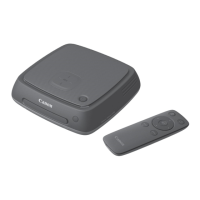
  • Control: Operated via an included remote control transmitter.

Usage Features:

  • Easy Setup: Initial settings guide users through language selection, Wi-Fi configuration (including "Find network" and "WPS Push button connection (PBC)" options), and date/time setting.
  • Intuitive Interface: The home screen provides quick access to key functions such such as "Image import status," "Images," "Albums," "New images received," "Print," "Send/receive images," and "Preferences."
  • NFC Tap-to-Connect: Simplifies wireless image transfer from compatible Canon cameras/camcorders by simply holding the camera near the NFC connect point on the CS100.
  • Card Import: Supports direct import from SD and CF cards. Instructions are provided for correct card insertion and removal to prevent damage.
  • Wired USB Import: Allows importing from cameras/camcorders connected via a USB interface cable.
  • Image Management:
    • New Images Received: Automatically groups newly imported images for easy review and allows compilation into albums. The device indicates new images with a blinking blue notification lamp.
    • Albums: Users can create and organize custom albums.
    • Viewing Options: Images can be listed by shooting month or camera/camcorder.
  • Remote Control: A dedicated remote control with power, home, set, back, menu, and cross keys provides full navigation and control of the device's interface on the TV screen.
  • Multi-language Support: The initial setup allows selection from various languages including English, Japanese, French, Italian, German, Spanish, Simplified Chinese, Russian, and Korean.

Maintenance Features:

  • Firmware Updates: The device supports firmware updates for product improvement or new functions. The power lamp blinks green during updates. Users are advised to refer to the Canon website for the latest manual reflecting updates.
  • Backup and Restore: Images can be backed up to an external hard disk and restored from backup, ensuring data safety.
  • Troubleshooting Indicators:
    • Power Lamp: Indicates device status (on, off, standby, updating firmware, error) with different colors and blinking patterns.
    • Access Lamp: Blinks during image import/copy/backup and stays lit when processing is complete.
    • Wi-Fi/New Image Notification Lamp: Blinks during wireless image import, when new images are available, or during NFC connection establishment.
  • Compatibility Information: The manual specifies that descriptions are current as of February 2015 and advises contacting a Canon Service Center for compatibility with products introduced after this date. It also notes that interface or functions may change due to updates.

Canon Connect Station CS100 Specifications

General IconGeneral
BrandCanon
ModelConnect Station CS100
CategoryStorage
LanguageEnglish

Related product manuals