232
QuickReference(English/
中
文
)
QuickReference
Use the Memo function
1
In the main text screen of any dictionary, press twice (once for the Book-
mark function) and
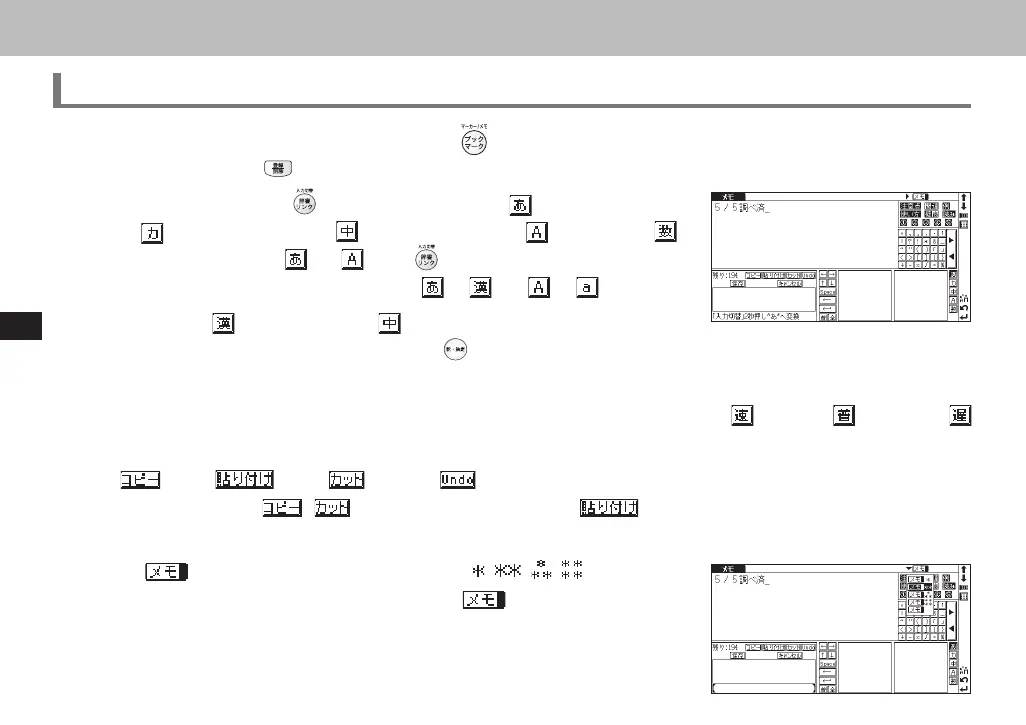
to enter the Memo edit screen.
2
In the edit screen , press to shift to the input mode. (Japanese Hiragana)
→
(Japanese Katakana) → (Chinese Character) → (Alphabet) →
(Number). When using and , press longer than 2 seconds to change
the mode to the alternative input mode (
⇔ and ⇔ ) .
3
When using (Japanese Kanji) or mode, the character conversion func-
tion is available. Enter the letter(s) and press
to convert.
4
There are two writing recognition boxes. Both of them are effective simultaneously. Using the two boxes consecutively
can speed up the input process. Writing recognition speed can be adjusted by tapping
(Quick) ⇔ (General) ⇔
(Slow) at the middle lower part of the edit screen (The adjustment will be effective throughout the editing process).
5
(Copy) (Paste) (Cut) and (Undo) functions are operated by the stylus. Use the stylus to select a
block of words, tap
/ to copy/cut the source, and tap to paste the source onto the specified position
where the cursor located.
6
Tap to set up Memo Group option. Choose / / / to group the
Memo. The selected icon will be shown next to
.
CSH06H206-P227-233 06.8.17, 4:40 PMPage 232 AdobePageMaker6.5J/PPC



 To Next Page
 Loading...