231
QuickReference(English/
中
文
)
QuickReference
Use the Multi-Key Search function
1
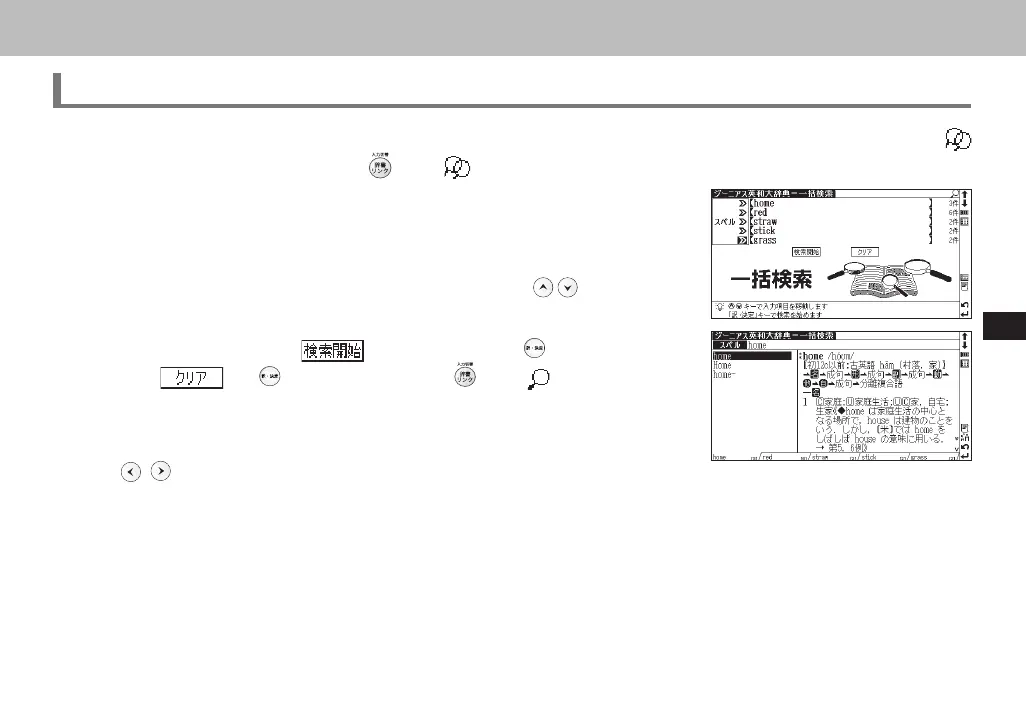
In the initial search screen of any dictionary and the Multiple Dictionary Search, plural keywords can be entered. If
appears next to input fields, press or tap with the stylus to display the Multi-Key Search screen.
2
Up to 5 entries can be entered at a time. The restriction of the original input
method will be applied in the Multi-Key Search. The number of matched re-
sults for the word completely inputted will be shown at the end of the input
field when the cursor is moved to other field by pressing
.
3
While the input field or is highlighted, press to start a search.
Press
and to reset the entry. Press or tap with the stylus to
return to the single entry search screen.
4
In the search result screen, each matched word will provide its own list. Press
to shift among different result lists.
CSH06H206-P227-233 06.8.17, 4:40 PMPage 231 AdobePageMaker6.5J/PPC



 To Next Page