EasyManua.ls Logo

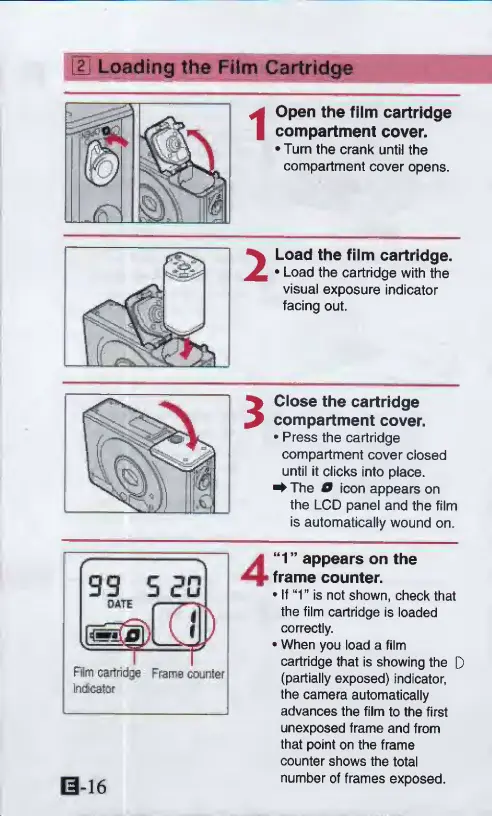
Canon ELPH 2 - Loading the Film Cartridge; Open the film cartridge compartment cover; Drop in the film and close the cover

Canon ELPH 2
53 pages
Print Icon
To Next Page IconTo Next Page
To Previous Page IconTo Previous Page
Loading...
IS
Loading
the
Film
Cartridge
Open
the
film
cartridge
compartment
cover.
•Turn
the
crank
until
the
compartment
cover
opens.
2
Load
the
film
cartridge.
Load
the
cartridge
with
the
visual
exposure
indicator
facing
out.
i
Close
the
cartridge
compartment
cover.
Press
the
cartridge
compartment
cover
closed
until
it
clicks
into
place.
^
The
O
icon
appears
on
the
LCD
panel
and
the
film
is
automatically
wound
on.
f
-
99
OATE
Js@>
0
)
Film
cartridge
1
r
Frame
counter
Investor
E-16
“1”
appears
on
the
frame
counter.
If‘T
is
not
shown,
check
that
the
film
cartridge
is
loaded
correctly.
When
you
load
a
film
cartridge
that
is
showing
the
D
(partially
exposed)
indicator,
the
camera
automatically
advances
the
film
to
the
first
unexposed
frame
and
from
that
point
on
the
frame
counter
shows
the
total
number
of
frames
exposed.

Other manuals for Canon ELPH 2

Related product manuals