EasyManua.ls Logo

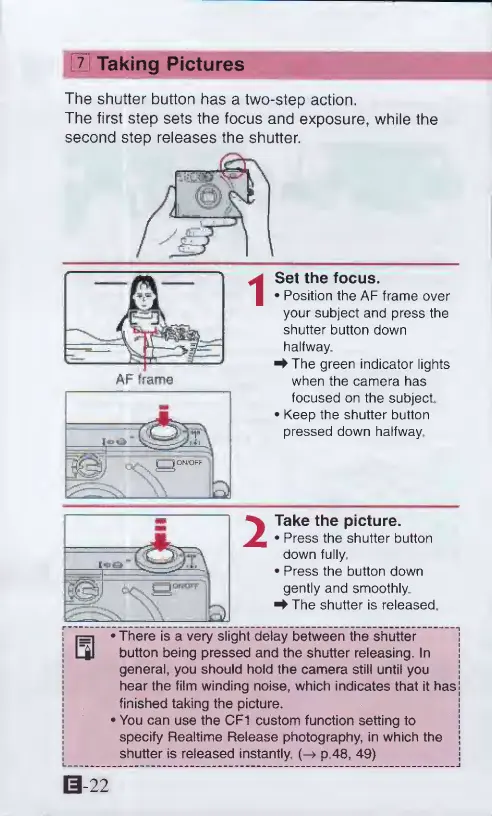
Canon ELPH 2 - Taking Pictures; Position AF frame and press shutter button; 7 Taking Pictures

Canon ELPH 2
53 pages
Print Icon
To Next Page IconTo Next Page
To Previous Page IconTo Previous Page
Loading...
EtiTaking
Pictures
The
shutter
button
has
a
two-step
action.
The
first
step
sets
the
focus
and
exposure,
while
the
second
step
releases
the
shutter.
Set
the
focus.
Position
the
AF
frame
over
your
subject
and
press
the
shutter
button
down
halfway,
^The
green
indicator
lights
when
the
camera
has
focused
on
the
subject
Keep
the
shutter
button
pressed
down
halfway.
I
r=i
There
is
a
very
slight
delay
between
the
shutter
I
L|1
button
being
pressed
and
the
shutter
releasing.
In
general,
you
should
hold
the
camera
still
until
you
hear
the
film
winding
noise,
which
indicates
that
it
has
j
finished
taking
the
picture,
j
You
can
use
the
CF1
custom
function
Setting
to
specify
Realtime
Release
photography,
in
which
the
shutter
is
released
instantly.
p
48,
49)
Take
the
picture.
Press
the
shutter
button
down
fully,
Press
the
button
down
gently
and
smoothly.
^The
shutter
is
released
0-22

Other manuals for Canon ELPH 2

Related product manuals