EasyManua.ls Logo

Canon ELPH 2 - Green;Orange Indicators

Canon ELPH 2
53 pages
Print Icon
To Next Page IconTo Next Page
To Previous Page IconTo Previous Page
Loading...
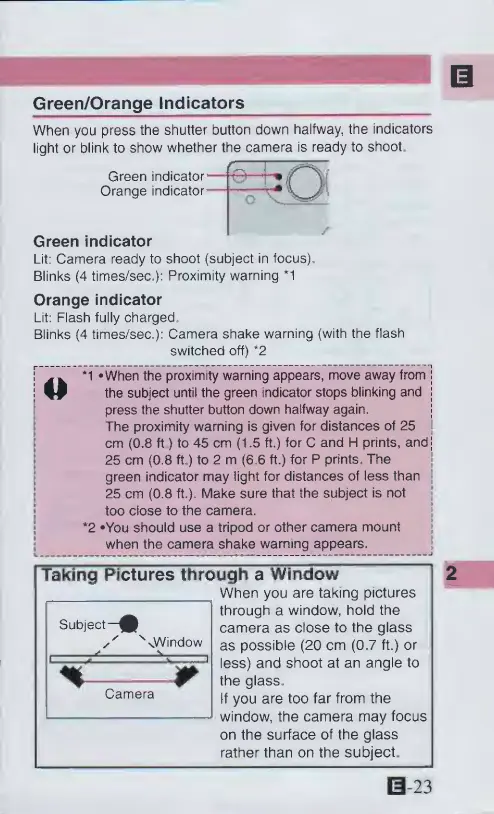
Green/Orange
Indicators
When
you
press
the
shutter
button
down
halfway,
the
indicators
light
or
blink
to
show
whether
the
camera
is
ready
to
shoot.
Green
indicator
Orange
indicator
Green
indicator
Lit:
Camera
ready
to
shoot
(subject
in
focus).
Blinks
(4
times/sec,):
Proximity
warning
*1
Orange
indicator
Lit:
Flash
fully
charged
Blinks
(4
times/sec.):
Camera
shake
warning
(with
the
flash
switched
off)
*2
*1
-When
the
proximity
warning
appears,
move
away
from
W
the
subject
until
the
green
indicator
stops
blinking
and
press
the
shutter
button
down
halfway
again.
The
proximity
warning
is
given
for
distances
of
25
cm
(0.8
ft)
to
45
cm
(1.5
ft.)
for
C
and
H
prints,
and
25
cm
(0.8
ft.)
to
2
m
(6
6
ft.)
for
P
prints.
The
green
indicator
may
light
for
distances
of
less
than
25
cm
(0.8
ft.).
Make
sure
that
the
subject
is
not
too
close
to
the
camera.
*2
*You
should
use
a
tripod
or
other
camera
mount
when
the
camera
shake
warning
appears.
Subject-
sWindow
Taking
Pictures
through
a
Window
When
you
are
taking
pictures
through
a
window,
hold
the
camera
as
close
to
the
glass
as
possible
(20
cm
(0.7
ft.)
or
less)
and
shoot
at
an
angle
to
the
glass
If
you
are
too
far
from
the
window,
the
camera
may
focus
on
the
surface
of
the
glass
rather
than
on
the
subject.
Camera
0-23

Other manuals for Canon ELPH 2

Related product manuals