EasyManua.ls Logo

Canon ELPH 2 - Page 24

Canon ELPH 2
53 pages
Print Icon
To Next Page IconTo Next Page
To Previous Page IconTo Previous Page
Loading...
Taking
Pictures
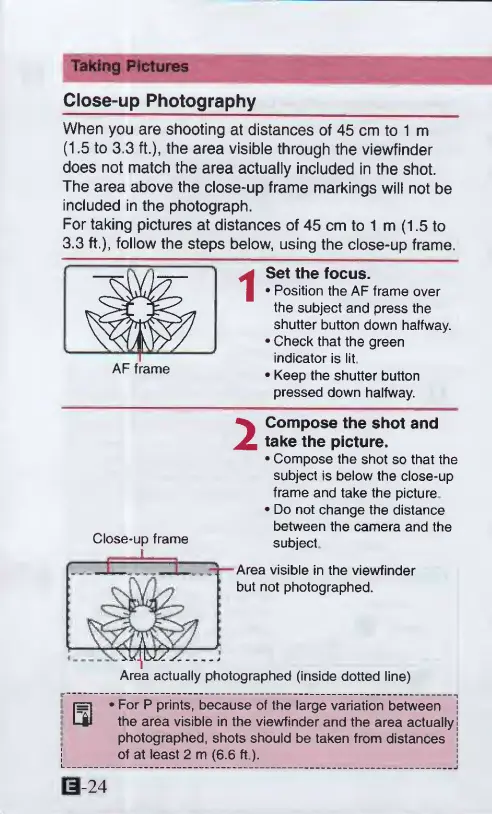
Close-up
Photography
When
you
are
shooting
at
distances
of
45
cm
to
1
m
(1.5
to
3.3
ft.),
the
area
visible
through
the
viewfinder
does
not
match
the
area
actually
included
in
the
shot.
The
area
above
the
close-up
frame
markings
will
not
be
included
in
the
photograph.
For
taking
pictures
at
distances
of
45
cm
to
1
m
(1.5
to
3.3
ft.),
follow
the
steps
below,
using
the
close-up
frame.
AF
frame
i
Set
the
focus.
Position
the
AF
frame
over
the
subject
and
press
the
shutter
button
down
halfway.
Check
that
the
green
indicator
is
lit,
Keep
the
shutter
button
pressed
down
halfway.
2
Compose
the
shot
and
take
the
picture.
Compose
the
shot
so
that
the
subject
is
below
the
close-up
frame
and
take
the
picture
Do
not
change
the
distance
between
the
camera
and
the
subject
-Area
visible
in
the
viewfinder
but
not
photographed.
Area
actually
photographed
(inside
dotted
line)
Close-up
frame
0
*
For
P
prints,
because
of
the
large
variation
between
1
the
area
visible
in
the
viewfinder
and
the
area
actually!
photographed,
shots
should
be
taken
from
distances
|
of
at
least
2
m
(6.6
ft.).
0-24

Other manuals for Canon ELPH 2

Related product manuals