EasyManua.ls Logo

Canon ELPH 2 - Removing the Film Cartridge; Remove the film cartridge when finished; 8 Removing the Film Cartridge

Canon ELPH 2
53 pages
Print Icon
To Next Page IconTo Next Page
To Previous Page IconTo Previous Page
Loading...
[a
Removing
the
Film
Cartridge
The
film
rewinds
automatically
when
it
reaches
the
end
The
frame
counter
counts
down
as
the
film
rewinds
and
the
O
icon
blinks
when
the
film
is
fully
rewound.
To
remove
the
film
cartridge
before
the
end
of
the
film
is
reached,
see
p.44.
You
can
use
the
CF3
custom
function
setting
to
prevent
the
camera
from
automatically
rewinding
when
it
reaches
the
end
of
the
film.
(-»
p.48)
33
5?0
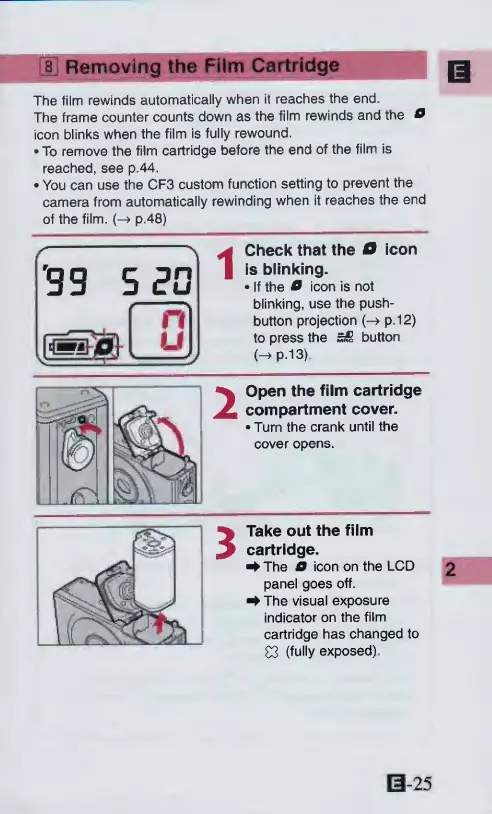
1
Check
that
the
O
icon
is
blinking.
If
the
O
icon
is
not
blinking,
use
the
push¬
button
projection
p.12)
to
press
the
button
HP-13)
2
Open
the
film
cartridge
compartment
cover.
Turn
the
crank
until
the
cover
opens.
3
Take
out
the
film
cartridge.
^
The
O
icon
on
the
LCD
panel
goes
off.
^
The
visual
exposure
indicator
on
the
film
cartridge
has
changed
to
03
(fully
exposed)
S-25

Other manuals for Canon ELPH 2

Related product manuals