EasyManua.ls Logo

Canon ELPH 2 - 2 Auto Flash With Red-eye Reduction

Canon ELPH 2
53 pages
Print Icon
To Next Page IconTo Next Page
To Previous Page IconTo Previous Page
Loading...
HI
<§><*)
Auto
Flash
With
Red-eye
Reduction
Use
this
mode
to
reduce
the
red-eye
effect
when
you
are
taking
pictures
of
people
in
low-light
conditions.
When
you
press
the
shutter
button,
the
red-eye
reduction
lamp
lights
and
then
the
flash
fires.
%
<a>
t
4i
s<a>
*
®
H'
'99
5
E»?t
IppjjA
i
c’u
D
*
2m
-IW
i
2
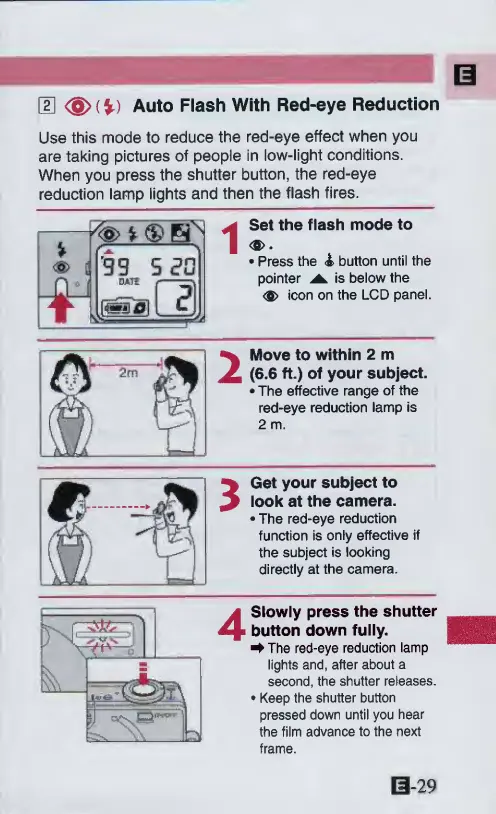
Set
the
flash
mode
to
<a>.
Press
the
<&
button
until
the
pointer
is
below
the
icon
on
the
LCD
panel.
Move
to
within
2
m
(6.6
ft.)
of
your
subject.
The
effective
range
of
the
red-eye
reduction
lamp
is
2
m.
3
Get
your
subject
to
look
at
the
camera.
The
red-eye
reduction
function
is
only
effective
if
the
subject
is
looking
directly
at
the
camera.
4
Slowly
press
the
shutter
button
down
fully.
^
The
red-eye
reduction
lamp
lights
and,
after
about
a
second,
the
shutter
releases.
Keep
the
shutter
button
pressed
down
until
you
hear
the
film
advance
to
the
next
frame.
0-29

Other manuals for Canon ELPH 2

Related product manuals