EasyManua.ls Logo

Canon ELPH 2 - 1 Auto Flash Without Red-eye Reduction

Canon ELPH 2
53 pages
Print Icon
To Next Page IconTo Next Page
To Previous Page IconTo Previous Page
Loading...
Changing
the
Flash
Mode
D
{%)
Auto
Flash
Without
Red-eye
Reduction
Use
this
mode
to
take
pictures
of
subjects
other
than
people,
or
to
photograph
people
without
using
the
red¬
eye
reduction
lamp.
In
this
mode,
the
shutter
releases
immediately.
In
backlit
or
low-light
conditions,
the
flash
fires
automatically
when
you
press
the
shutter
button.
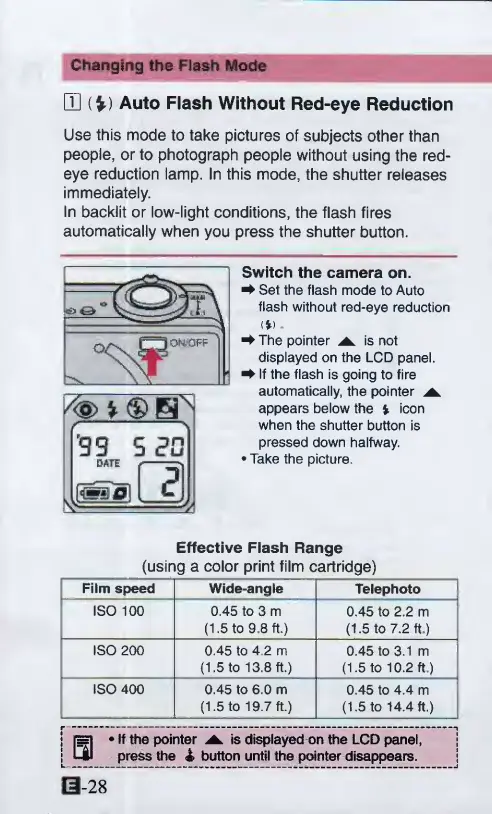
Switch
the
camera
on.
^
Set
the
flash
mode
to
Auto
flash
without
red-eye
reduction
<*)
^
The
pointer
is
not
displayed
on
the
LCD
panel.
^
If
the
flash
is
going
to
fire
automatically,
the
pointer
appears
below
the
i
icon
when
the
shutter
button
is
pressed
down
halfway.
Take
the
picture.
Effective
Flash
Range
(using
a
color
print
film
cartridge)
Film
speed
Wide-angle
Telephoto
ISO
100
0.45
to
3
m
(1.5
to
9.8
ft.)
0.45
to
2.2
m
(1.5
to
7.2
ft.)
ISO
200
0.45
to
4.2
m
(1.5
to
13.8
ft.)
0.45
to
3.1
m
(1.5
to
10.2
ft)
ISO
400
0.45
to
6.0
m
(1.5
to
19.7
ft.)
0.45
to
4.4
m
(1.5
to
14.4
ft.)
r-----1
|
r=|
If
the
pointer
^
is
displayed
on
the
LCD
panel,
[CM
press
the
4
button
until
thepointer
disappears.
j
0-28
*
®
B^

Other manuals for Canon ELPH 2

Related product manuals