EasyManua.ls Logo

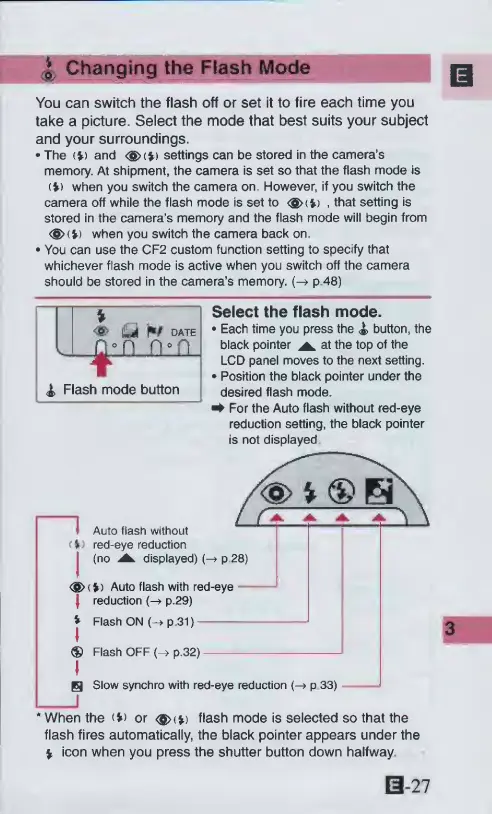
Canon ELPH 2 - Changing the Flash Mode; Select the flash mode

Canon ELPH 2
53 pages
Print Icon
To Next Page IconTo Next Page
To Previous Page IconTo Previous Page
Loading...
*
Changing
the
Flash
Mode
You
can
switch
the
flash
off
or
set
it
to
fire
each
time
you
take
a
picture.
Select
the
mode
that
best
suits
your
subject
and
your
surroundings.
The
(*)
and
<§>(*)
settings
can
be
stored
in
the
camera’s
memory.
At
shipment,
the
camera
is
set
so
that
the
flash
mode
is
(>>
when
you
switch
the
camera
on.
However,
if
you
switch
the
camera
off
while
the
flash
mode
is
set
to
<$><*)
,
that
setting
is
stored
in
the
camera’s
memory
and
the
flash
mode
will
begin
from
<®>(V)
when
you
switch
the
camera
back
on
You
can
use
the
CF2
custom
function
setting
to
specify
that
whichever
flash
mode
is
active
when
you
switch
off
the
camera
should
be
stored
in
the
camera’s
memory.
(-»
p.48)
Select
the
flash
mode.
Each
time
you
press
the
<&
button,
the
black
pointer
^
at
the
top
of
the
LCD
panel
moves
to
the
next
setting.
Position
the
black
pointer
under
the
desired
flash
mode.
^
For
the
Auto
flash
without
red-eye
reduction
setting,
the
black
pointer
is
not
displayed
I
Auto
flash
without
<%>
red-eye
reduction
I
(no
displayed)
(-
P-28)
<g>(l)
Auto
flash
with
red-eye
|
reduction
p.29)
*
Flash
ON
(-*
p
31)
®
Flash
OFF
(-»
p.32)
S
Slow
synchro
with
red-eye
reduction
p
33)
‘When
the
(V)
or
<$><*)
flash
mode
is
selected
so
that
the
flash
fires
automatically,
the
black
pointer
appears
under
the
%
icon
when
you
press
the
shutter
button
down
halfway
B-27

Other manuals for Canon ELPH 2

Related product manuals