EasyManua.ls Logo

Canon ELPH 2 - Using Focus Lock

Canon ELPH 2
53 pages
Print Icon
To Next Page IconTo Next Page
To Previous Page IconTo Previous Page
Loading...
Using
Focus
Lock
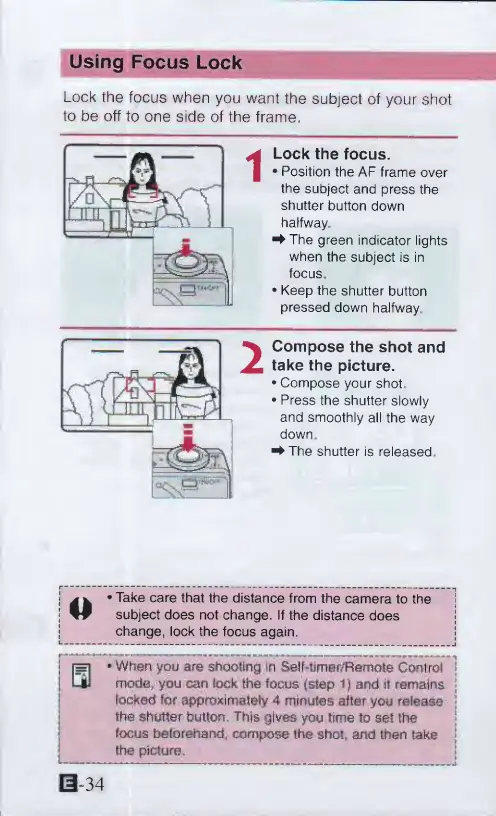
Lock
the
focus
when
you
want
the
subject
of
your
shot
to
be
off
to
one
side
of
the
frame.
Lock
the
focus.
Position
the
AF
frame
over
the
subject
and
press
the
shutter
button
down
halfway
^
The
green
indicator
lights
when
the
subject
is
in
focus
Keep
the
shutter
button
pressed
down
halfway
Compose
the
shot
and
take
the
picture.
Compose
your
shot
Press
the
shutter
slowly
and
smoothly
all
the
way
down
4
-
The
shutter
is
released
O
*
Take
care
that
the
distance
from
the
camera
to
the
subject
does
not
change.
If
the
distance
does
change,
lock
the
focus
again.
*
When
you
are
shooting
In
Self-timer/Remote
Control
mode,
you
can
lock
the
focus
{step
1)
and
ii
remains
locked
for
approximately
4
minutes
after
you
release
the
shutter
button
This
gives
you
time
to
set
the
focus
beforehand,
compose
the
shot,
and
then
take
the
picture.
0-34

Other manuals for Canon ELPH 2

Related product manuals