EasyManua.ls Logo

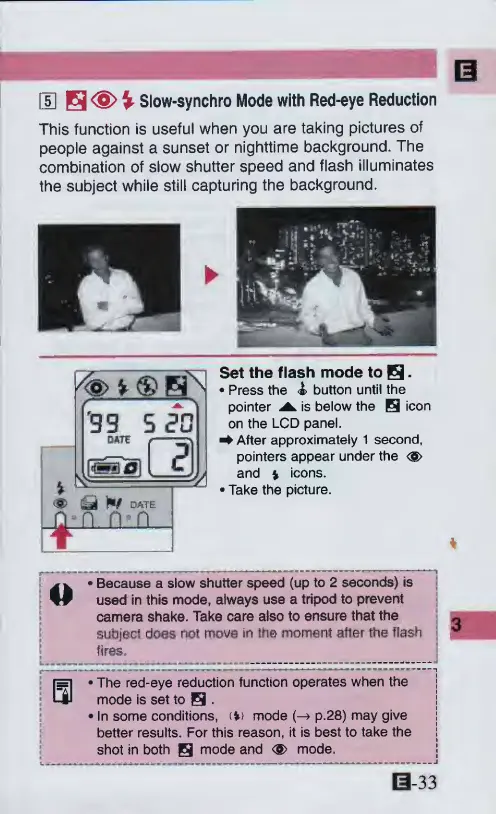
Canon ELPH 2 - 5 Slow-synchro Mode with Red-eye Reduction

Canon ELPH 2
53 pages
Print Icon
To Next Page IconTo Next Page
To Previous Page IconTo Previous Page
Loading...
IS
H
<S>
%
Slow-synchro
Mode
with
Red-eye
Reduction
This
function
is
useful
when
you
are
taking
pictures
of
people
against
a
sunset
or
nighttime
background.
The
combination
of
slow
shutter
speed
and
flash
illuminates
the
subject
while
still
capturing
the
background.
1
%>
v
®
s\
'33
5ZG
%
4^
h/
QATE
n
n
a
"T
Set
the
flash
mode
to
s-
Press
the
<£>
button
until
the
pointer
is
below
the
H
icon
on
the
LCD
panel.
^
After
approximately
1
second,
pointers
appear
under
the
<g>
and
%
icons.
Take
the
picture.
Because
a
slow
shutter
speed
(up
to
2
seconds)
is
used
in
this
mode,
always
use
a
tripod
to
prevent
camera
shake.
Take
care
also
to
ensure
that
the
subject
does
not
move
in
the
moment
after
the
flash
fires.
0
*
*
The
red-eye
reduction
function
operates
when
the
mode
is
set
to
H
In
some
conditions,
(V>
mode
(-4
p.28)
may
give
better
results.
For
this
reason,
it
is
best
to
take
the
shot
in
both
H
mode
and
<S>
mode.
033

Other manuals for Canon ELPH 2

Related product manuals