EasyManua.ls Logo

Canon ELPH 2 - Shooting with the Optional Remote Control

Canon ELPH 2
53 pages
Print Icon
To Next Page IconTo Next Page
To Previous Page IconTo Previous Page
Loading...
um
Shooting
with
the
Optional
Remote
Control
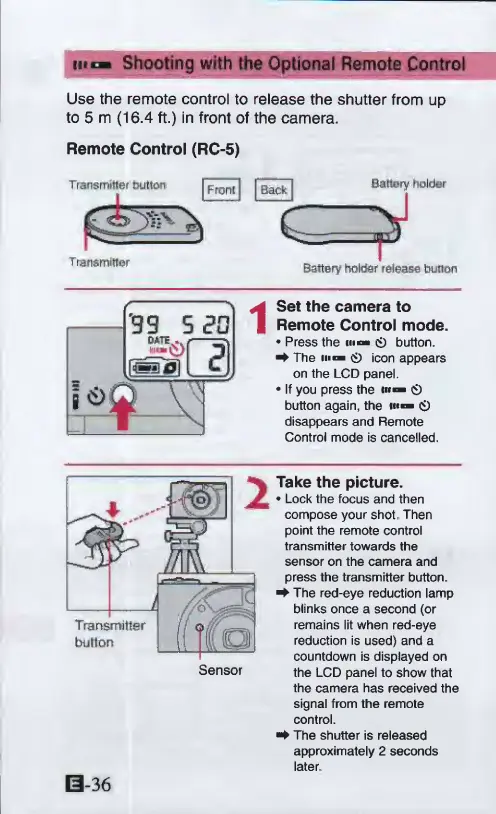
Use
the
remote
control
to
release
the
shutter
from
up
to
5
m
(16.4
ft.)
in
front
of
the
camera.
Remote
Control
(RC-5)
Transmitter
button
|
Fron[
j
j
Back
j
Battery
bolder
Transmitter
Battery
holder
release
button
Set
the
camera
to
Remote
Control
mode.
Press
the
»
0
button.
^
The
m
0
icon
appears
on
the
LCD
panel.
If
you
press
the
m
0
button
again,
the
««
0
disappears
and
Remote
Control
mode
is
cancelled.
Take
the
picture.
Lock
the
focus
and
then
compose
your
shot
Then
point
the
remote
control
transmitter
towards
the
sensor
on
the
camera
and
press
the
transmitter
button.
^
The
red-eye
reduction
lamp
blinks
once
a
second
(or
remains
lit
when
red-eye
reduction
is
used)
and
a
countdown
is
displayed
on
the
LCD
panel
to
show
that
the
camera
has
received
the
signal
from
the
remote
control.
The
shutter
is
released
approximately
2
seconds
later
0-36

Other manuals for Canon ELPH 2

Related product manuals