EasyManua.ls Logo

Canon ELPH 2 - Page 37

Canon ELPH 2
53 pages
Print Icon
To Next Page IconTo Next Page
To Previous Page IconTo Previous Page
Loading...
Replacing
the
Remote
Control
Battery
Replace
the
battery
when
the
remote
control
will
no
longer
release
the
shutter.
Battery:
One
CR
2032
3V
lithium
battery
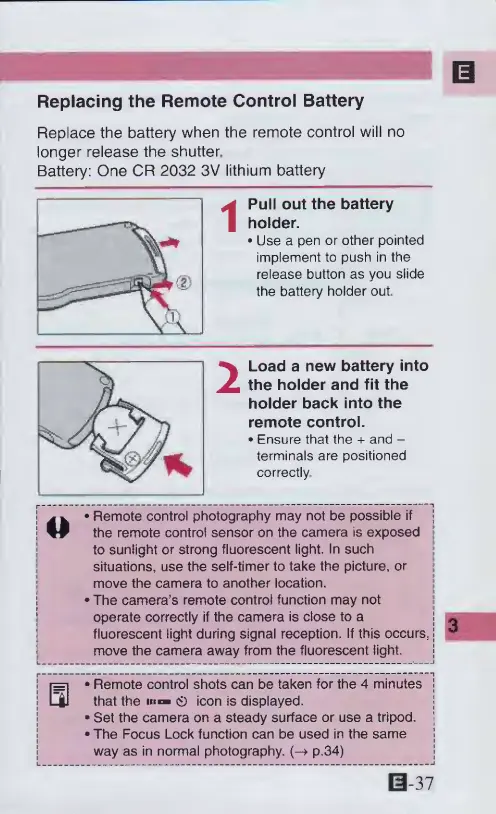
Pull
out
the
battery
holder.
*
Use
a
pen
or
other
pointed
implement
to
push
in
the
release
button
as
you
slide
the
battery
holder
out.
2
Load
a
new
battery
into
the
holder
and
fit
the
holder
back
into
the
remote
control.
Ensure
that
the
+
and
-
terminals
are
positioned
correctly
|
m
^
Remote
control
photography
may
not
be
possible
if
|
j
the
remote
control
sensor
on
the
camera
is
exposed
to
sunlight
or
strong
fluorescent
light.
In
such
situations,
use
the
self-timer
to
take
the
picture,
or
move
the
camera
to
another
location.
!
The
camera’s
remote
control
function
may
not
operate
correctly
if
the
camera
is
close
to
a
fluorescent
light
during
signal
reception.
If
this
occurs,
move
the
camera
away
from
the
fluorescent
light,
S
*
Remote
control
shots
can
be
taken
for
the
4
minutes
j
that
the
m
ci)
icon
is
displayed.
]
Set
the
camera
on
a
steady
surface
or
use
a
tripod.
J
The
Focus
Lock
function
can
be
used
in
the
same
j
way
as
in
normal
photography.
(-4
p.34)
0-37

Other manuals for Canon ELPH 2

Related product manuals