EasyManua.ls Logo

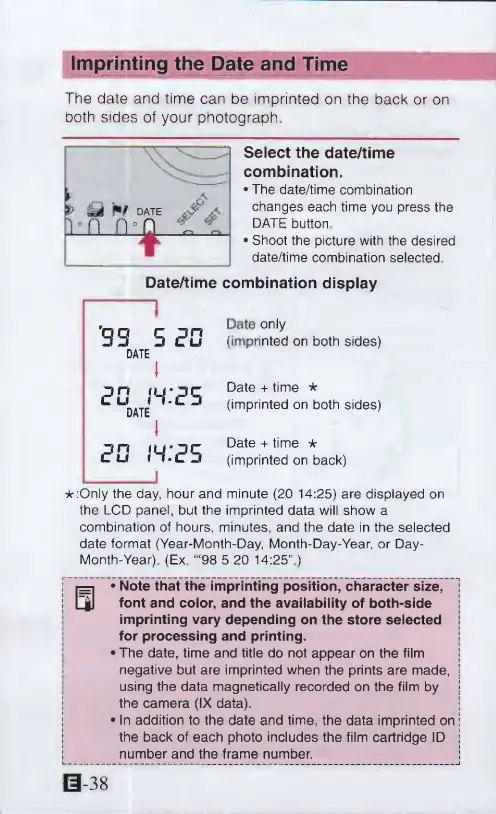
Canon ELPH 2 - Imprinting the Date and Time; Select the date;time combination

Canon ELPH 2
53 pages
Print Icon
To Next Page IconTo Next Page
To Previous Page IconTo Previous Page
Loading...
Imprinting
the
Date
and
Time
The
date
and
time
can
be
imprinted
on
the
back
or
on
both
sides
of
your
photograph.
Select
the
date/time
combination.
The
date/time
combination
changes
each
time
you
press
the
DATE
button
Shoot
the
picture
with
the
desired
date/time
combination
selected
Date/time
combination
display
'33
5
20
DATE
I
8C
m:?S
DATE
I
ED
IH.'c’S
Date
only
(imprinted
on
both
sides)
Date
+
time
*
(imprinted
on
both
sides)
Date
+
time
*
(imprinted
on
back)
*:Only
the
day,
hour
and
minute
(20
14:25)
are
displayed
on
the
LCD
panel,
but
the
imprinted
data
will
show
a
combination
of
hours,
minutes,
and
the
date
in
the
selected
date
format
(Year-Month-Day,
Month-Day-Year,
or
Day-
Month-Year)
(Ex.
“‘98
5
20
14:25”)
S
*
Note
that
the
imprinting
position,
character
size,
1
font
and
color,
and
the
availability
of
both-side
imprinting
vary
depending
on
the
store
selected
j
for
processing
and
printing.
I
The
date,
time
and
title
do
not
appear
on
the
film
j
negative
but
are
imprinted
when
the
prints
are
made,
j
using
the
data
magnetically
recorded
on
the
film
by
|
*'
i
the
camera
(IX
data).
1
I
In
addition
to
the
date
and
time,
the
data
imprinted
on
j
I
the
back
of
each
photo
includes
the
film
cartridge
ID
|
I
number
and
the
frame
number.
S
0-38

Other manuals for Canon ELPH 2

Related product manuals