EasyManua.ls Logo

Canon ELPH 2 - Imprinting Titles; Selecting the Title Language

Canon ELPH 2
53 pages
Print Icon
To Next Page IconTo Next Page
To Previous Page IconTo Previous Page
Loading...
(•J
Imprinting
Titles
You
can
imprint
titles
on
the
back
of
the
print.
Select
a
title
from
the
different
titles
available
while
the
camera
is
turned
on
Selecting
the
Title
Language
'
\
lI
*
1
NlT
p|
Nagg]
C
J
w
n-n
A
i
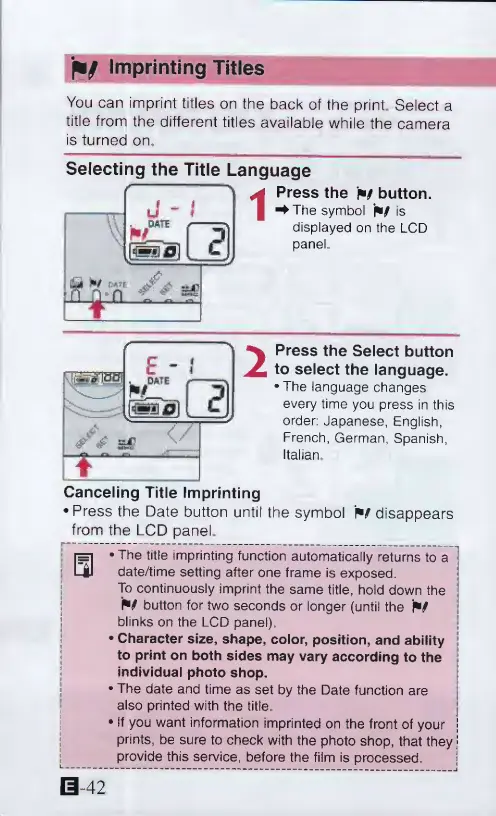
Press
the
w
button.
^The
symbol
W
is
displayed
on
the
LCD
panel
2
Press
the
Select
button
to
select
the
language.
•
The
language
changes
every
time
you
press
in
this
order:
Japanese,
English,
French,
German,
Spanish,
Italian
Canceling
Title
Imprinting
•
Press
the
Date
button
until
the
symbol
w
disappears
from
the
LCD
panel.
•The
title
imprinting
function
automatically
returns
to
a
date/time
setting
after
one
frame
is
exposed.
To
continuously
imprint
the
same
title,
hold
down
the
P9
button
for
two
seconds
or
longer
(until
the
blinks
on
the
LCD
panel),
•
Character
size,
shape,
color,
position,
and
ability
to
print
on
both
sides
may
vary
according
to
the
individual
photo
shop.
•
The
date
and
time
as
set
by
the
Date
function
are
also
printed
with
the
title
•
If
you
want
information
imprinted
on
the
front
of
your
prints,
be
sure
to
check
with
the
photo
shop,
that
they
provide
this
service,
before
the
film
is
processed
S
42