EasyManua.ls Logo

Canon ELPH 2 - Troubleshooting

Canon ELPH 2
53 pages
Print Icon
To Next Page IconTo Next Page
To Previous Page IconTo Previous Page
Loading...
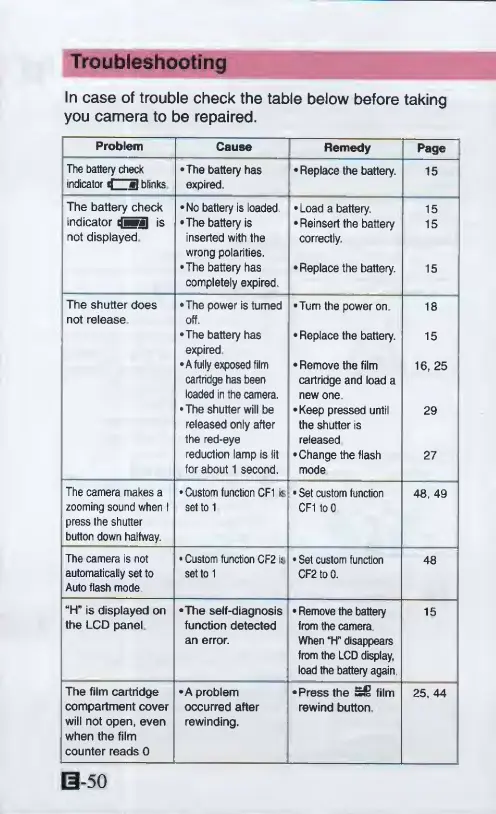
Troubleshooting
In
case
of
trouble
check
the
table
below
before
taking
you
camera
to
be
repaired.
Problem
Cause
Remedy
Page
The
battery
check
indicator
d
a
blinks
•The
battery
has
expired.
•Replace
the
battery.
15
The
battery
check
•No
battery
is
loaded
•Load
a
battery.
15
indicator
ififiBI
is
•The
battery
is
•Reinsert
the
battery
15
not
displayed
inserted
with
the
wrong
polarities.
correctly.
•The
battery
has
completely
expired
•Replace
the
battery.
15
The
shutter
does
not
release
•The
power
is
turned
off.
•Turn
the
power
on
18
•The
battery
has
expired
Replace
the
battery.
15
•A
fully
exposed
film
cartridge
has
been
loaded
in
the
camera.
Remove
the
film
cartridge
and
load
a
new
one
16,
25
•The
shutter
will
be
released
only
after
the
red-eye
•Keep
pressed
until
the
shutter
is
released
29
reduction
lamp
is
lit
for
about
1
second.
•Change
the
flash
mode
27
The
camera
makes
a
•Custom
function
CF1
is
Set
custom
function
48,
49
zooming
sound
when
1
press
the
shutter
button
down
halfway.
set
to
1
CF1
to
0
The
camera
is
not
Custom
function
CF2
is
Set
custom
function
48
automatically
set
to
Auto
flash
mode
set
to
1
CF2
to
0.
“H"
is
displayed
on
•The
self-diagnosis
Remove
the
battery
15
the
LCD
panel
function
detected
an
error.
from
the
camera
When
“H"
disappears
from
the
LCD
display,
load
the
battery
again
The
film
cartridge
•A
problem
•Press
the
film
25,44
compartment
cover
will
not
open,
even
when
the
film
counter
reads
0
occurred
after
rewinding.
rewind
button
B-50

Other manuals for Canon ELPH 2

Related product manuals