EasyManua.ls Logo

Canon EOS 1000F - Page 2

Canon EOS 1000F
32 pages
Print Icon
To Next Page IconTo Next Page
To Previous Page IconTo Previous Page
Loading...
«
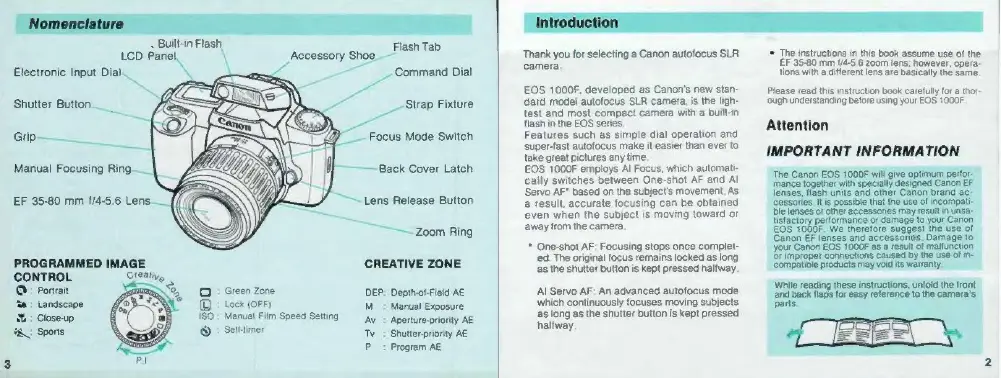
Built-in
Flash,
lash
Ti
LCD
Panel.
\
Accessory
shoe
eerie
Electronic
Input
Dial.
si
Command
Dial
Shutter
Button
Strap
Fixture
=-
Grip
Focus
Mode
Switch
Manual
Focusing
Ring.
Back
Cover
Latch
EF
35-80
mm
{/4-5.6
Len:
Lens
Release
Button
Zoom
Ring
CREATIVE
ZONE
CONTROL
Q:
Portrait
Green
Zone
DEP:
Depth-of-Field
AE
‘a:
Landscape
1
Lock
(OFF)
M
:
Manual
Exposure
1:
Close-up
+
Manual
Film
Speed
Setting
Av
:
Aperture-priority
AE
YA
Sports
Selt-timer
Tv
:
Shutter-priority
AE
P
:
Program
AE
Thank
you
for
selecting
a
Canon
autofocus
SLR
camera
EOS
1000F,
developed
as
Canon's
new
stan-
dard
model
autofocus
SLR
camera,
is
the
ligh-
test
and
most
compact
camera
with
a
built-in
flash
in
the
EOS
series.
Features
such
as
simple
dial
operation
and
super-fast
autofocus
make
it
easier
than
ever
to
take
great
pictures
any
time.
EOS
1000F
employs
Al
Focus,
which
automati-
cally
switches
between
One-shot
AF
and
Al
Servo
AF"
based
on
the
subject's
movement.
As
a
result,
accurate
focusing
can
be
obtained
even
when
the
subject
is
moving
toward
or
away
from
the
camera.
*
One-shot
AF;
Focusing
stops
once
complet-
ed.
The
original
focus
remains
locked
as
long
as
the
shutter
button
is
kept
pressed
halfway.
Al
Servo
AF:
An
advanced
autofocus
mede
which
continuously
focuses
moving
subjects
as
long
as
the
shutter
button
is
kept
pressed
halfway.
©
The
instructions
in
this
book
assume
use
of
the
EF
35-80
mm
1/4-5.6
zoom
lens;
however,
opera-
tions
with
a
different
lens
are
basically
the
same.
Please
read
this
instruction
book
carefully
for
a
thor
‘ough
understanding
before
using
your
EOS
1000F
Attention
IMPORTANT
INFORMATION
‘The
Canon
EOS
1000F
wili
give
opiu
perdar
ble
lenses
or
ol
tistactory
performance
of
damage
to
peut
canon
he
use
of
your
Canon
EOS
1000F
as
a
result
of
malt
Or
improper
Connections
caused
by
the
use
of
in-
compatible
products
may
void
its
warranty,
While
reading
these
instructions,
unfold
the
Iront
arias
flaps
for
easy
reference
to
the
camera's
parts.

Related product manuals