EasyManua.ls Logo

Canon EOS 5000 - Checking the Battery Level

Canon EOS 5000
33 pages
Print Icon
To Next Page IconTo Next Page
To Previous Page IconTo Previous Page
Loading...
I. PREPARATIONS
Checking the Battery
Level
o\
.g
c
1
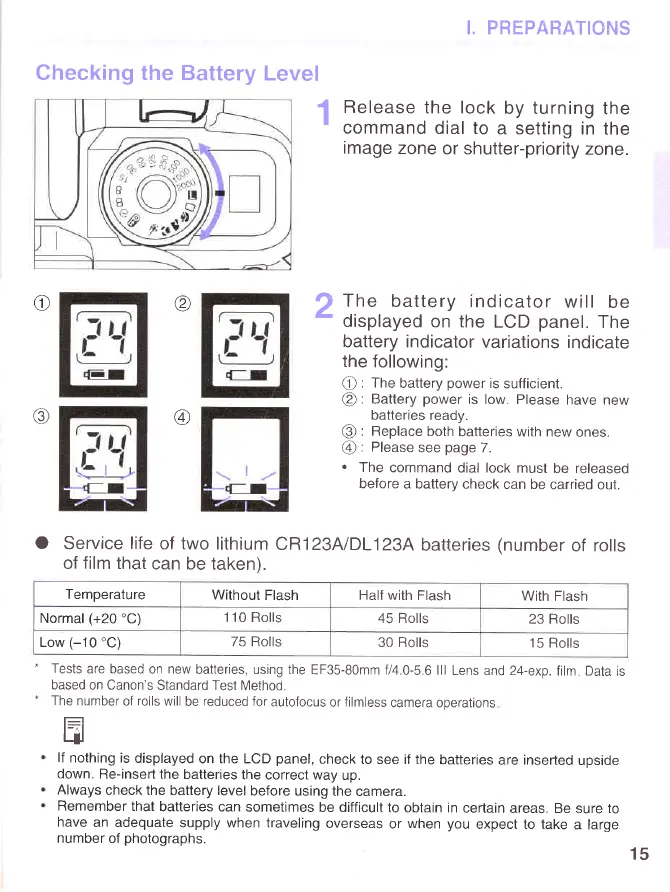
Release
the lock
by turning
the
'
command
dial to
a setting
in the
image
zone
or shutter-priority
zone.
ra
\v,/
)
The
battery indicator
will
be
-
displayed
on the
LCD
panel.
The
battery indicator
variations
indicate
the
following:
@
: The
battery
power
is
sufficient.
@:
Battery
power
is low. Please
have new
batteries
ready.
@
: Replace
both
batteries with new
ones.
@
: Please
see
page
7.
.
The
command
dial lock must
be released
before
a battery check
can be
carried out.
O
Service
life
of two
lithium
CR123A/DL123A
batteries
(number
of rolls
of
film
that
can be
taken).
-
Tests
are based
on new
batteries, using the
EF35-80mm
f14.0-5.6 lll
Lens and24-exp.
film Data
is
based on Canon's
Standard Test
Method.
-
The number
of
rolls
will
be
reduced
for
autofocus
or
filmless
camera operations
f=]
tJl
lf
nothing is
displayed
on the LCD
panel,
check
to see if the
batteries
are inserted
upside
down.
Re-insert the
batteries
the correct way
up.
Always
check the battery level
before using the
camera.
Remember
that
batteries
can sometimes
be difficult
to obtain in
certain
areas. Be
sure
to
have
an adequate
supply when traveling
overseas
or
when
you
expect to take
a large
number
of
photographs
@
15
Temperature
Without
Flash
Half
with Flash
With Flash
Normal
(+20'C)
1 10 Rolls
45 Rolls
23 Rolls
Low
(-10'C)
75 Rolls
30 Rolls
15 Rolls
www.orphancameras.com