_:,_ Registeringa PictureStyle"_
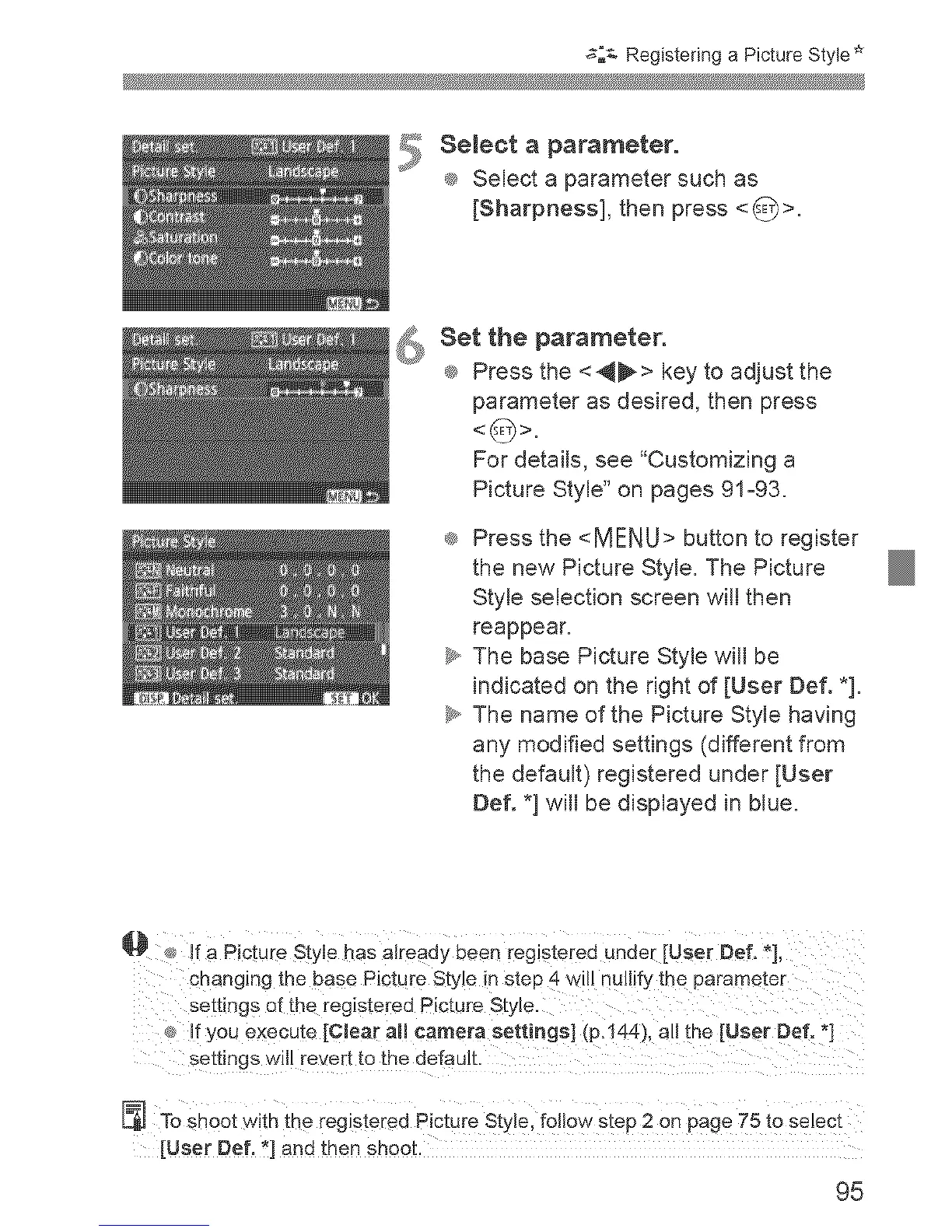
5 eJect a parameter.
® Select a parameter such as
[Sharpness], then press <_>.
Set the parameter.
® Press the <_> key to adjust the
parameter as desired, then press
For details, see "Customizing a
Picture Style" on pages 91o93.
® Press the <MENU> button to register
the new Picture Style. The Picture
Style selection screen will then
reappear.
_y,,The base Picture Style will be
indicated on the right of [User Def. *].
_y,,The name of the Picture Style having
any modified settings (different from
the default) registered under [User
Def. *] will be displayed in blue.
@
If a Picture Style has already been registered under [User Defo _],
cnanging the base Picture Style in step 4 will nullify the parame[er
settings of the registered Picture Style.
If you execute [CJear aH camera settings] (p.144), all the [User Def. *]
settings will revert to the default
To shoot with the registered Picture Style. follow step 2 on page 75 to select
[User Def. *] ann then SHOO[.
95












 To Next Page