_FE Lock*
FE lock locks the flash exposure setting over the desired area of the
subject. This feature can also be used with a Canon EXoseries Speedlite.
* FEstands for Flash Exposure.
I
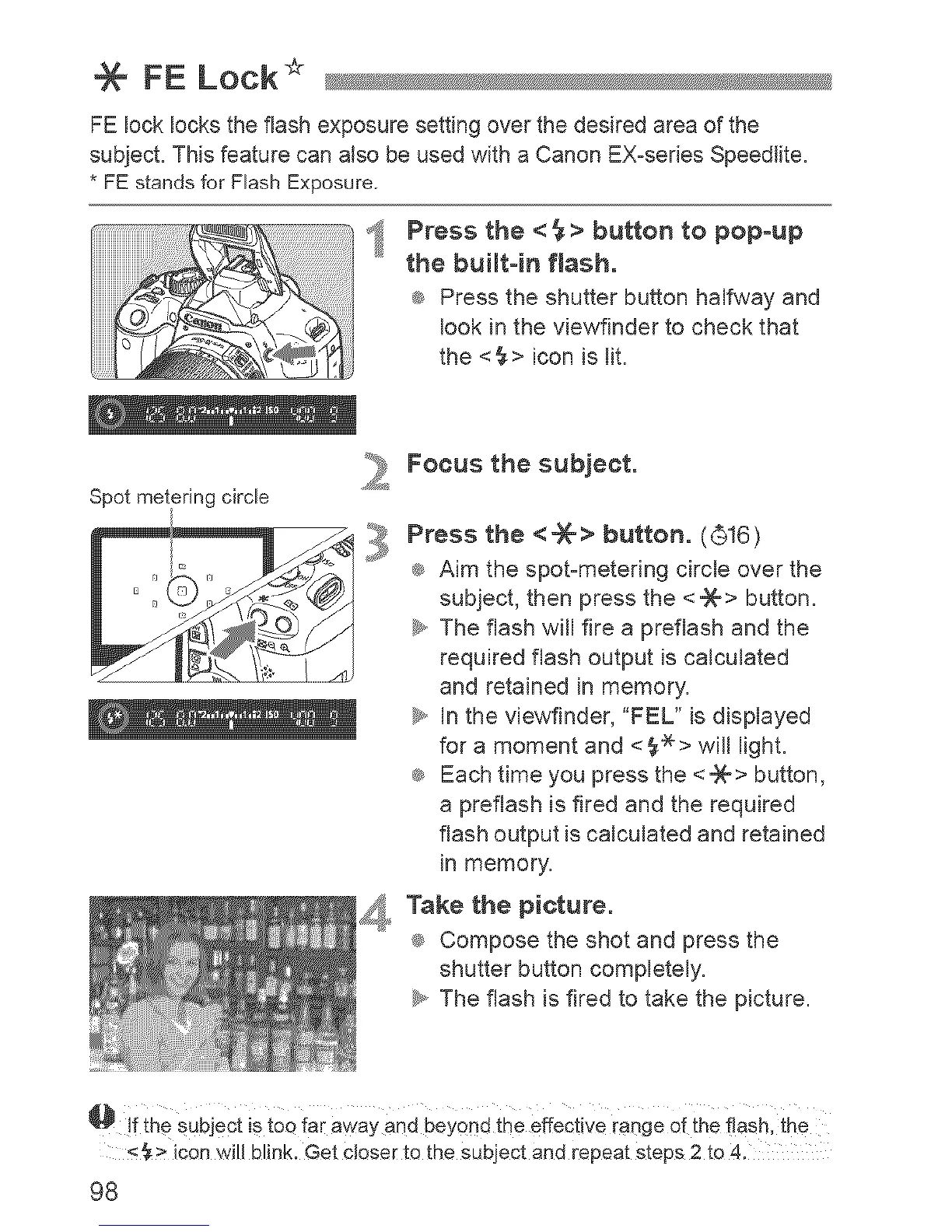
Press the < _ > button to popoup
the buiJtoin flash.
® Press the shutter button halfway and
look in the viewfinder to check that
the <_> icon is lit.
Spot metering circle
2
Focus the subject.
Press the < _X-> button. (©16)
® Aim the spot-metering circle over the
subject, then press the <_> button.
_y,,The flash will fire a preflash and the
required flash output is calculated
and retained in memory.
_y,,In the viewfinder, "FEL" is displayed
for a moment and <_> will light.
® Each time you press the <_> button,
a preflash is fired and the required
flash output is calculated and retained
in memory.
Take the picture.
® Compose the shot and press the
shutter button completely.
_. The flash is fired to take the picture.
@ Jfthe SubjeCt iStoo far away and Beyond the effective range of the flash, the
<_> ican will blink, Get cJoseFta the subject and repeat steps 2 to 4,
98












 To Next Page