33
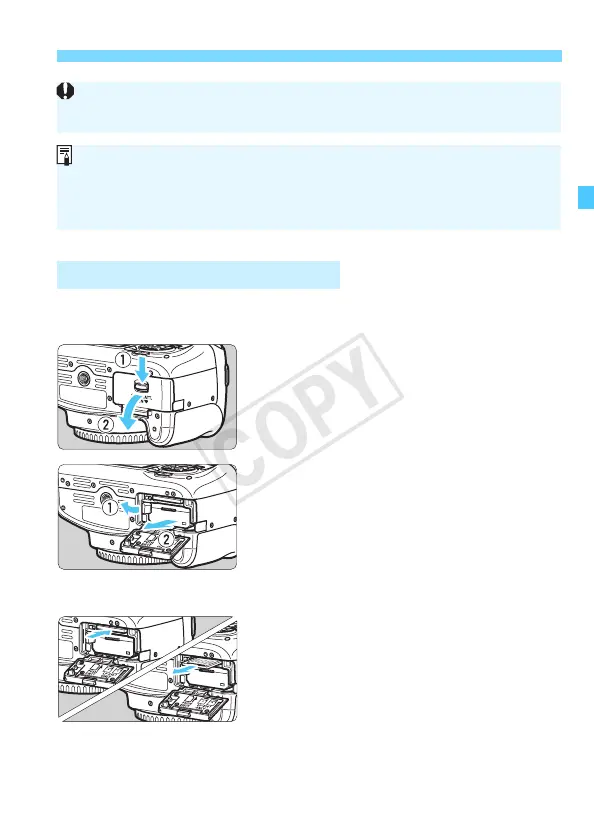
Installing and Removing the Battery and Card
1
Set the power switch to <2>
(p.35).
2
Open the cover.
Make sure the access lamp is off,
then open the cover.
If [Recording...] is displayed, close
the cover.
3
Remove the battery.
Press the battery lock lever as shown
by the arrow and remove the battery.
To prevent short circuiting of the
battery contacts, be sure to attach the
provided protective cover (p.30) to
the battery.
4
Remove the card.
Gently push in the card, then let it go
to eject.
Pull the card straight out.
5
Close the cover.
Press the cover until it snaps shut.
Removing the Battery and Card
After opening the card slot/battery compartment cover, be careful not to
swing it back further. Otherwise, the hinge may break.
The number of possible shots depends on the remaining capacity of the
card, image-recording quality, ISO speed, etc.
Setting [z1: Release shutter without card] to [Disable] will prevent
you from forgetting to insert a card (p.180).



 To Next Page
 Loading...













