64
E
Additional
Information
Camera body and lens
• Use a soft, dry cloth to clean the camera body or lens. Never use chemically treated cloth or
volatile solvents such as paint thinner.
Video heads
• Clean the video heads only when necessary, preferably using Canon’s CC-8 Video Head
Cleaning Cassette.
• Do not use a wet-type cleaning cassette as this can cause damage.
Storage
If you do not intend to use the camera for some time, store it in an area which is free of dust and
moisture, and where the temperature is no higher than 86°F (30°C). After storage, check each
part and function of your camera to make sure everything is still working properly.
Maintenance
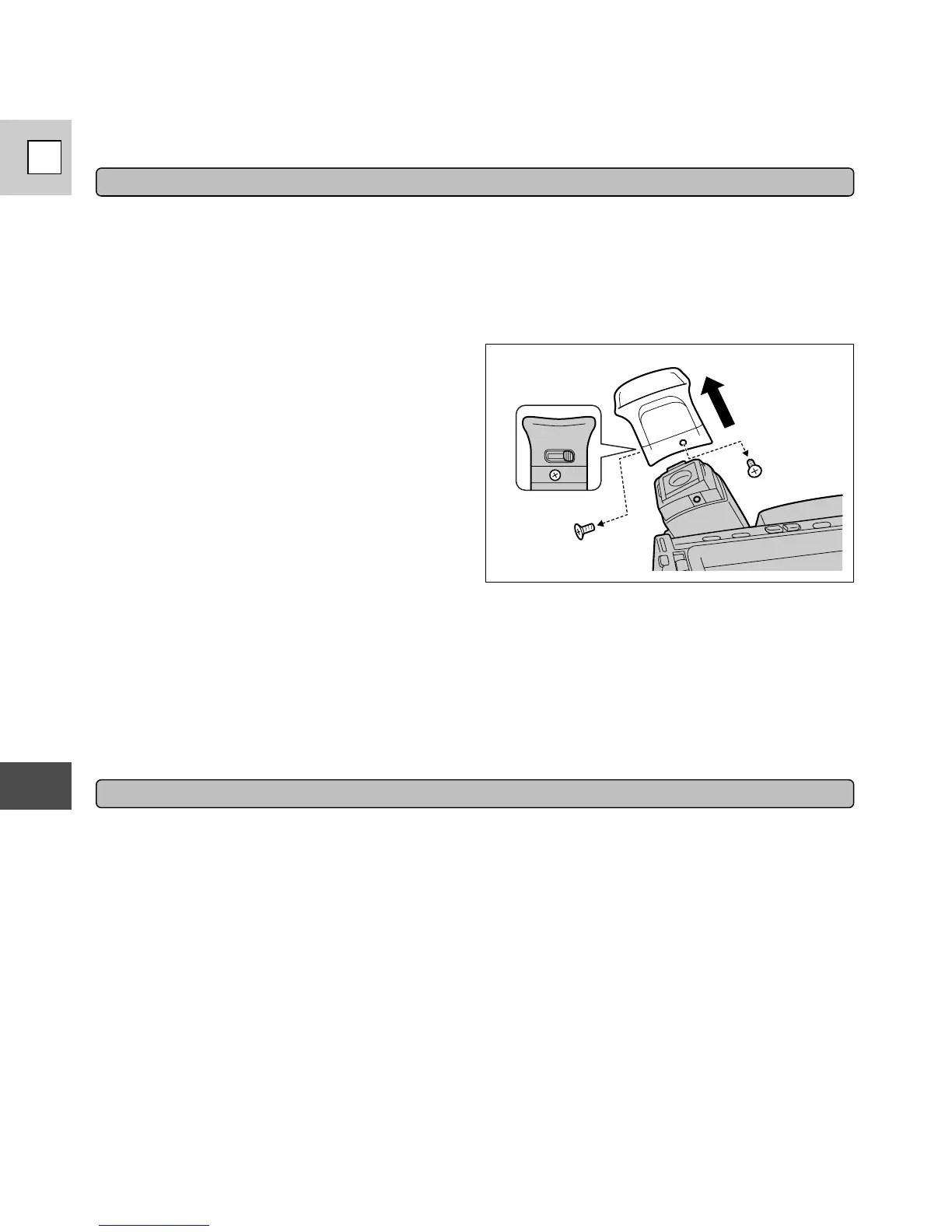
Viewfinder
•To clean the viewfinder screen, rotate the
viewfinder up and remove the two screws.
Pull the eyecup straight off.
•Clean the viewfinder screen with a
commercially available blower brush.
• Replace the eyecup by putting it back into
position and fixing it with the screws.
LCD
• Clean the LCD screen using a soft, dry cloth.
•Where there is a big change in temperature, moisture may form on the surface of the screen.
Wipe clean with a soft, dry cloth.
•At low temperatures the display may appear to be much darker than usual. This is not a fault,
and as the screen warms up the display will return to normal.


 To Next Page