7
Input Capacity
INPUTTING EXPRESSIONS AND VALUES
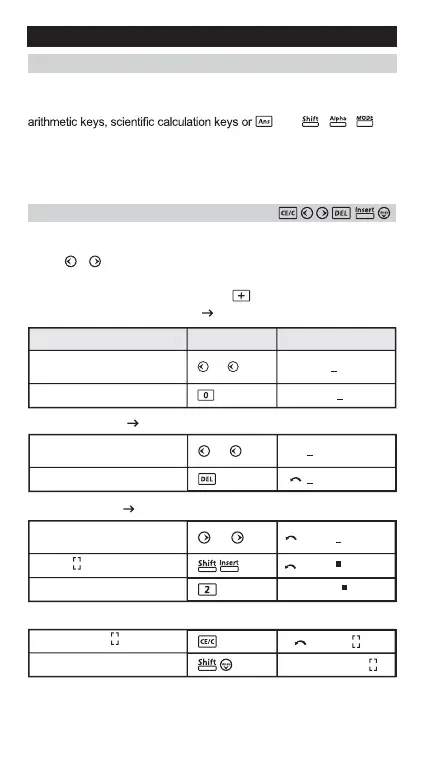
Input Editing
New input begins on the left of the upper (entry) line. As the entries
are more than 12 digits, the line will scroll to the right consecutively.
Press , to scroll the cursor within the upper (entry) line and
you can perform input editing as needed.
Example (under editing):
Replacing an entry ( 1234567 1234560 )
Press or keep pressing until
sknilb "7"
Replace with "0"
)reppU( yalpsiDgnitteS yalpsiD Operation
1234567 889900
Deletion (1234560 134560 )
Undo (889900)
Insertion (889900 2889900)
Press or keep pressing until
sknilb "2"
"2" is deleted
Press or keep pressing until
sknilb "8"
"8" and blinks alternately
Insert "2", "8" still blinking
Clear "889900", still blinking
Resume "889900"
F-715SG/F-715SA allows you to input a single calculation up to 79 steps.
One step is used as each time you press one of the numeric keys,
key. , , and
the direction keys will not use up any step. Starting from the 73rd step,
the cursor changes from [ _ ] to [
■
] that notifying the memory is running
low. In case you need to input a single calculation with more than 79
steps, you should separate your calculation into two or more segments.
• • •
1234567+8899
1234560+8899
• • •
1234560+8899
134560+88990
• • •
134560+88990
134560+88990
134560+28899
134560+2
⬅
560+2889900
⬅
⬅
⬅
⬅
⬅
⬅
⬅


 To Next Page