19 SHUTTER-PRIORITY AE
the various exposure modes can be used. For aperture-priority AK, first disengage
the lens’ aperture ring from the ”A” mark. Then set thg shutter dial to ”A,” and
manually select an aperture. The camera will sele ct the shutter speed automati-
cally.
For manual exposure, make sure that both the lens’ aperture ring and the shutter
dial are disengaged from the ”A” setting. Then set the shutter speed and aperture
manually, aligning the two needles in the viewfinder in the usual way.
For further details, see the power drive’s instructions.
Note
In general, center-weighted average metering is recommended for AE photography.
Please see p. 48 for further details.
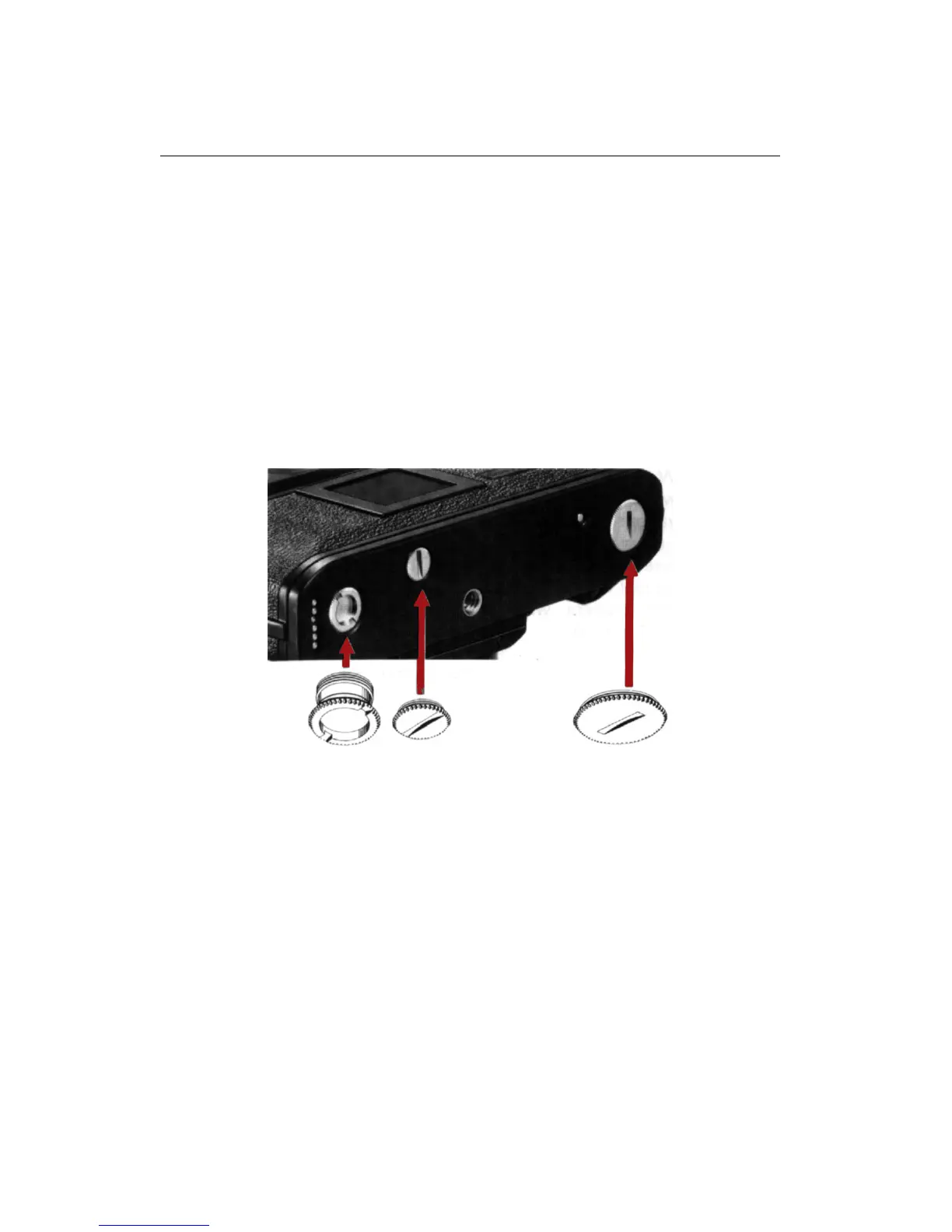
Socket Covers
There are three socket covers in the baseplate of the camera. All three must be
removed to attach the motor drive; for the power winder, only two (2) and (3) must
be removed. Do not remove them unless you intend to attach one of these AE power
drives. Above all, NEVER remove the rewind coupler cover (1) when film is loaded
in the camera or the film will be exposed to light.
CAUTION
• Do not set both the shutter dial and the lens’ aperture ring to the ”A” set-
tings.Otherwise, the lens will stop down to the smallest aperture and the
camera will operate in aperture-priority AE. Depending on the lighting con-
ditions, this may result in undesirably s low shutter speeds.
39











 To Next Page