EasyManua.ls Logo

Canon FT QL - Meter Circuit Switch; How to Average Exposures

Canon FT QL
44 pages
Print Icon
To Next Page IconTo Next Page
To Previous Page IconTo Previous Page
Loading...
When
ASA
25/DIN
15
appear
in
the
small
windows,
this
is
as
far
as
the
film
speed
set
ring
turns
to
the
left.
White
dots
at
the
right
turn
extremity
read
ASA
2000
and
DIN
34.
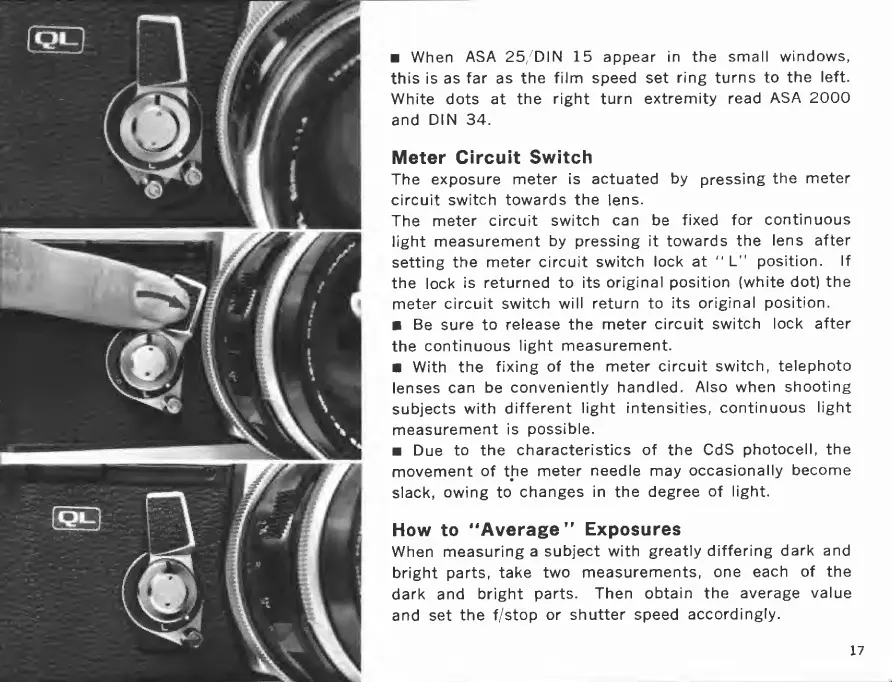
Meter
Circuit
Switch
The
exposure
meter
is
actuated
by
pressing
the
meter
circuit
switch
towards
the
lens.
The
meter
circuit
switch
can
be
fixed
for
continuous
light
measurement
by
pressing
it
towards
the
lens
after
setting
the
meter
circuit
switch
lock
at
"
L"
position.
If
the
lock
is
returned
to
its
original
position
(white
dot)
the
meter
circuit
switch
will
return
to
its
original
position.
Be
sure
to
release
the
meter
circuit
switch
lock
after
the
continuous
light
measurement.
With
the
fixing
of
the
meter
circuit
switch,
telephoto
lenses
can
be
conveniently
handled.
Also
when
shooting
subjects
with
different
light
intensities,
continuous
light
measurement
is
possible.
Due
to
the
characteristics
of
the
CdS
photocell,
the
movement
of
the
meter
needle
may
occasionally
become
slack,
owing
to
changes
in
the
degree
of
light.
How
to
"Average''
Exposures
When
measuring
a
subject
with
greatly
differing
dark
and
bright
parts,
take
two
measurements,
one
each
of
the
dark
and
bright
parts.
Then
obtain
the
average
value
and
set
the
f/stop
or
shutter
speed
accordingly.
17

Related product manuals