EasyManua.ls Logo

Canon FT QL - Using Built-In Exposure Meter; Film Speed Setting

Canon FT QL
44 pages
Print Icon
To Next Page IconTo Next Page
To Previous Page IconTo Previous Page
Loading...
Using
Built-In
Exposure
Meter
The
Canon
FT
provides
the
most
accurate
light
measure¬
ment
possible
with
it's
unique
TTL
(Through-The-Lens)
sys¬
tem.
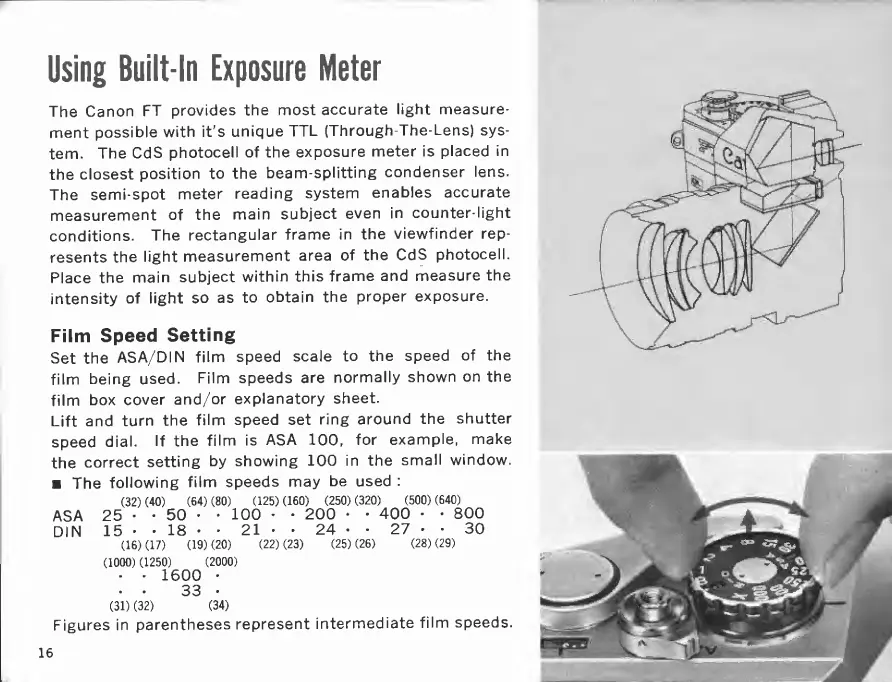
The
CdS
photocell
of
the
exposure
meter
is
placed
in
the
closest
position
to
the
beam-splitting
condenser
lens.
The
semi-spot
meter
reading
system
enables
accurate
measurement
of
the
main
subject
even
in
counter-light
conditions.
The
rectangular
frame
in
the
viewfinder
rep¬
resents
the
light
measurement
area
of
the
CdS
photocell.
Place
the
main
subject
within
this
frame
and
measure
the
intensity
of
light
so
as
to
obtain
the
proper
exposure.
Film
Speed
Setting
Set
the
ASA/DIN
film
speed
scale
to
the
speed
of
the
film
being
used.
Film
speeds
are
normally
shown
on
the
film
box
cover
and/or
explanatory
sheet.
Lift
and
turn
the
film
speed
set
ring
around
the
shutter
speed
dial.
If
the
film
is
ASA
100,
for
example,
make
the
correct
setting
by
showing
100
in
the
small
window.
The
following
film
speeds
may
be
used
:
(32)(40)
(64)(80)
(125)(160)
(250)(320)
(500)(640)
ASA
25
50
-
100
-
200
400
800
DIN
15
18
21
24
27
30
(16)(17)
(19)(20)
(22)(23)
(25)(26)
(28)(29)
(1000)(1250)
(2000)
1600
.
.
33
(31)(32)
(34)
Figures
in
parentheses
represent
intermediate
film
speeds.
16

Related product manuals