
 Need help?
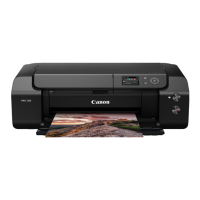
Do you have a question about the Canon imagePROGRAF PRO-300 and is the answer not in the manual?
Details the items included in the printer package, such as ink tanks, print head, and power cord.
Instructions for safely removing all protective packing materials and tape from the printer.
Steps to connect the power cord and activate the printer for the first time.
Step-by-step guide for the correct installation of the print head unit.
Procedure for inserting the ink tanks into their designated slots.
Instructions on how to load plain paper into the printer correctly.
Guide to connect the printer to a computer, typically via the Canon website and setup software.
Instructions for establishing a connection between the printer and a smartphone using the Canon app.
 General
| Type | printer |
|---|---|
| Color | black |
| Touch Screen | no |
| Display Size | 3 inches |
| Tray Capacity | 100 |
| Paper Size | 3.5” x 3.5” (square), 3.5” x 5”, 4” x 6”, 5” x 5” (square), 5” x 7”, 7” x 10”, 8” x 10”, letter (8.5” x 11”), legal (8.5” x 14”), 10” x 12”, 11” x 17” (ledger), 12” x 12” (square), 13” x 19” (a3+), 210×594mm (panorama size), custom (up to 13” x 39”) |
| Printing Method | color |
| Color Print Speed | 0 pages per minute |
| Mono Print Speed | 0 pages per minute |
| Print Resolution Mono | up to 4800 x 2400 |
| Print Resolution Color | up to 4800 x 2400 |
| Media Types | Plain Paper, Photo Paper Pro Platinum, Photo Paper Plus Glossy II, Photo Paper Glossy; Semi-Gloss: Photo Paper Plus Semi-Gloss, Photo Paper Pro Luster; Matte: Matte Photo Paper, Photo Paper Premium Matte;, Fine Art: Premium Fine Art Smooth, Premium Fine Art Rough, Other: Greeting Cards, Photo Stickers, Printable Nail Stickers, Cardstock, Printable CD / DVD / Blu-ray Discs |
| Two-Sided Printing | no |
| Maximum Number of Pages Per Month | unknown |
| Photo Printing | yes |
| Cartridges | pfi-300 photo black, pfi-300 matte black, pfi-300 cyan, pfi-300 magenta, pfi-300 yellow, pfi-300 gray, pfi-300 photo cyan, pfi-300 photo magenta, pfi-300 red, pfi-300 chroma optimizer |
| Number Of Cartridges | 10 |
| Number of Ink Tanks | 0 |
| Internal Memory | no |
| Memory Card | no |
| Network | wireless, wired |
| Connectivity | usb, wi-fi, ethernet, apple airprint, mopria print service, canon mobile printing |
| Smart Applications | amazon alexa, google assistant |
| Mobile Devices Connection | yes |
 Weight and Dimensions
| Depth | 15 inches |
|---|---|
| Height | 7.9 inches |
| Width | 25.2 inches |
| Net Weight | 31.6 pounds |










 To Next Page