Chapter 16
16-17
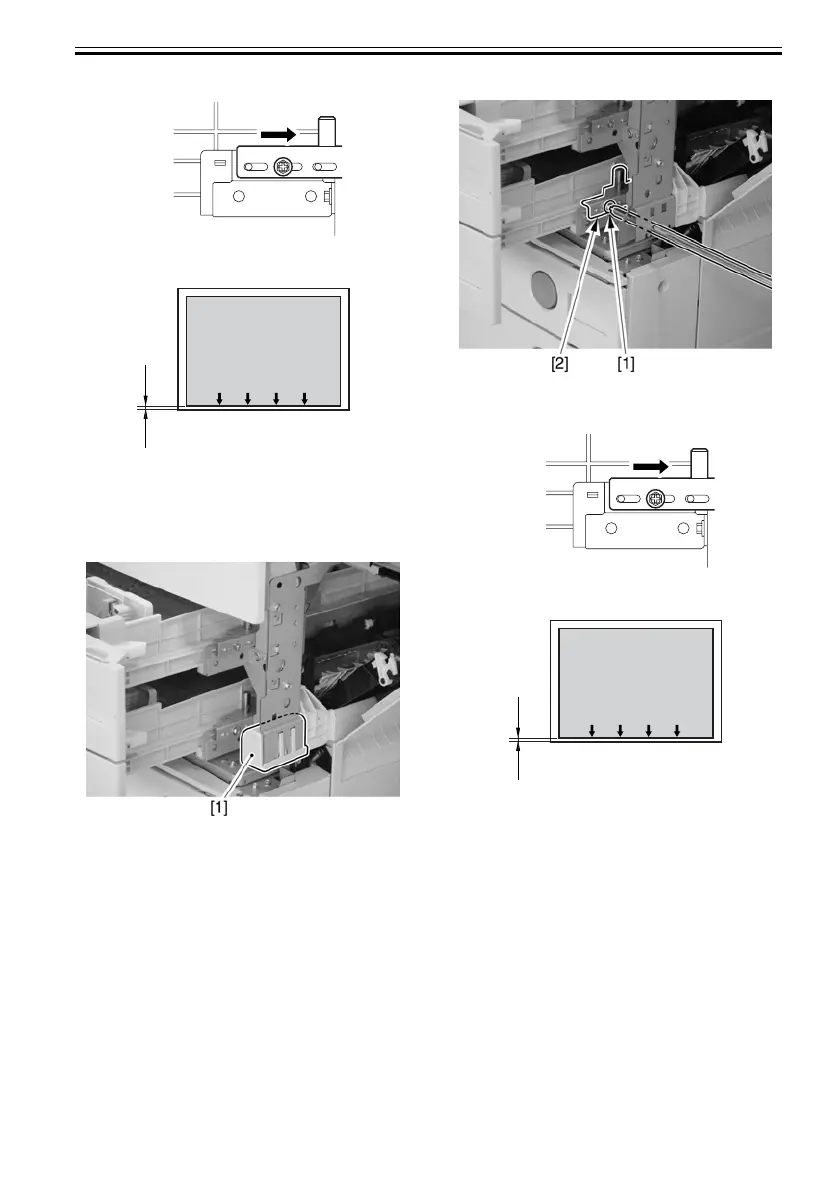
F-16-42
- Adjusting the Cassette 2 Side
3) Remove the grip [1] from the front right.
F-16-43
4) Insert a screwdriver through the hole in the front
right stay, and loosen the screw [1] to adjust the
position of the adjusting plate [2].
F-16-44
F-16-45
2. Adjusting the Horizontal Registration on the
2nd Side
Use the following service mode to adjust:
COPIER>ADJUST>FEED-ADJ>ADJ-REFE
16.7.2 Adjusting the Horizontal
Registration When Replacing the
Duplex Unit
After replacing the horizontal registration motor,
horizontal registration sensor, duplex unit, and fixing
delivery unit, follow the adjustment showing below.
COPIER>ADJUST>FEED>ADJ>ADJ-REFE
Image
L2
will decrease the margin on
the front side of the paper.
Moving the adjusting
plate to the right
Image
L2
will decrease the margin on
the front side of the paper.
Moving the adjusting
plate to the right





 To Next Page