1
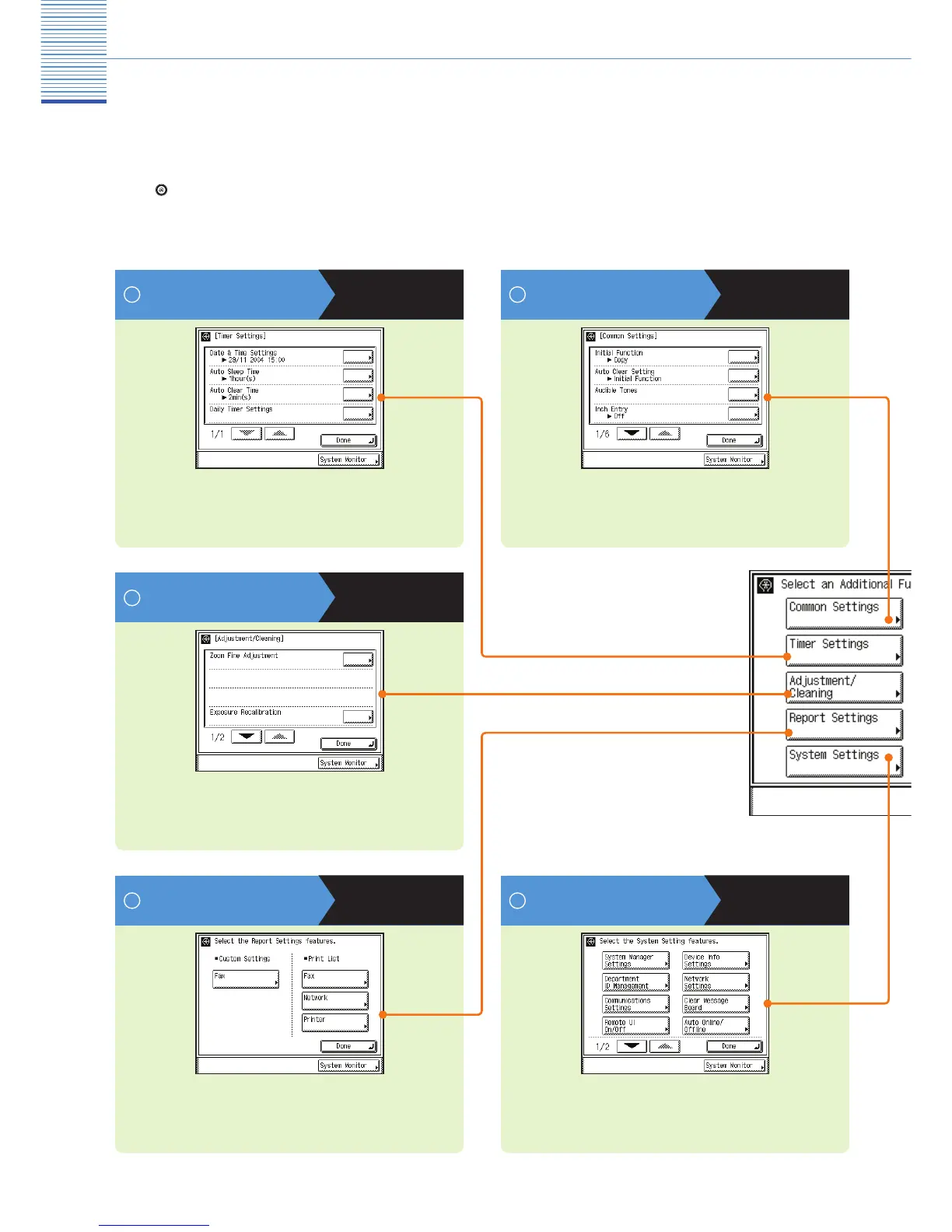
Press on the touch panel to display the Additional Functions screen. The Additional Functions screen enables
you to customize the various settings of the machine. You can also make the necessary settings for using the Fax
function, such as the telephone line type and fax number.
Timer Settings
Press to make various timer related settings for the machine,
such as the time it takes for the machine to enter into the
Sleep mode.
Additional Functions
Common Settings
Press to specify the settings that are common to the Copy,
Mail Box, and Fax functions.
1
See p. 5
Adjustment/Cleaning
Press to make fi ne adjustments to the zoom, adjust the
contrast, or perform cleaning for the machine.
See p. 6
See p. 3
Report Settings
Press to set the print conditions for printing a TX Report and
Activity Report, or you can print the contents of the Address
Book or Additional Functions.
System Settings
Press to set System Settings, Department ID Management
settings, Network Settings, and other system settings.
See p. 7 See p. 8
2
3
4 5



 To Next Page