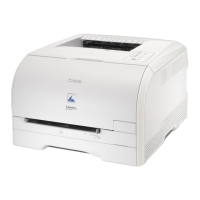
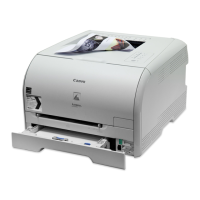
The provided document is a service manual for the Canon LBP5000/5100 Series printers.
Function Description
The Canon LBP5000/5100 Series are desktop color laser beam printers (LBPs) designed for high-performance printing in Windows operating systems. They utilize Canon Advanced Printing Technology (CAPT) to offload data processing to the PC, enabling faster printing without requiring additional printer memory.
The core functionality revolves around an image formation system that uses a 4-drum inline method. This involves four toner cartridges (cyan, magenta, yellow, black) arranged in a straight line, allowing for one-shot transfer of four colors. This inline method significantly reduces transfer time and increases full-color printing speed compared to conventional rotary constructions.
A key component of the image formation system is the Electrostatic Transportation Belt (ETB), which moves media and transfers images. The direct transfer of color images from the photosensitive drum to the media via the ETB contributes to the high printing speed.
The laser exposure system employs an integrated laser scanner unit with a 4-beam/2-mirror mechanism. This design directs two laser beams (for two colors) to each polygon mirror, eliminating the need for separate laser scanner units and reducing the likelihood of color displacement, while also allowing for a smaller laser unit.
For fixing the toner image, the machine uses an on-demand fixing method with a ceramic heater. This technology, commonly found in mono-color printers, results in a shorter warm-up period and lower energy consumption.
The LBP5100 model includes a duplex unit as a standard feature, enabling automatic two-sided printing for various paper sizes (A4, Legal, Letter, Foolscap).
Important Technical Specifications
General:
- Body installation method: Desktop page printer
- Photosensitive medium: OPC drum
- Charging method: Roller charging
- Exposure method: Laser scanning
- Development method: Toner projection development
- Transfer method: By Electrostatic Transportation Belt
- Separation method: Curvature
- Pickup method: By cassette/manual feeder
- Cassette pickup method: By separation pad
- Drum cleaning method: By blade
- Transfer cleaning method: Drum static collection
- Fixing method: On-demand
- Delivery method: Face-down
- Contrast adjustment function: Auto
- Toner level detection function: Available
- Toner type: Non-magnetic, 1-component dry toner
LBP5000 Specifics:
- Toner supply type: By EP cartridge (for A4/LTR, about 2500 impressions of Bk; about 2000 impressions of M, C, and Y)
- Warm-up time: 195 sec or less (approx.; at power-on, at 20 deg C)
- Image margin (Leading edge/Trailing edge): 5.0+1.5/-1.5mm
- Image margin (Left/right): 5.0+1.0/-1.0mm
- Number of gradations: 16 gradations
- Printing resolution: 600dpi×600dpi
- First print time: 20 sec or less (approx.; both mono- and full-color)
- Print speed (A4): 8 impressions/min (approx.; both mono- and full color)
- Cassette paper size: A4, B5, LGL, LTR, Executive, Index Card, envelope, user-defined sheet (76.2 to 215.9 mm in length, 127.0 to 355.6 mm in width)
- Multifeeder paper size: Same as for cassette
- Cassette paper type: Plain paper (60 to 90 g/m2), heavy paper (91 to 163 g/m2), envelope (Envelope DL, Envelope COM10, Envelope C5, Envelope Monarch, Envelope B5), label sheet, transparency ((Black and white printing only)
- Multifeeder tray paper type: Same as for cassette
- Cassette capacity: 250 sheets (64 g/m2)
- Multifeeder tray capacity: 1 sheet
- Delivery tray stack: 125 sheets (plain paper, 64 g/m2)
- Memory: 8 MB (addition not possible)
- Auto gradation correction: Available
- Operating environment (Temperature range): 10°C to 30°C
- Operating environment (Humidity range): 10% to 80%RH
- Operating environment (Atmospheric pressure): 810.6 to 1013.3 hpa (0.8 to 1.0 atm)
- Noise: 25 dB or less (standby); 50 dB or less (print)
- Power supply rating: 110 - 127 V 50/60 Hz; 220 - 240 V 50/60 Hz
- Power consumption (Maximum): 110 - 127V: 746W or less; 220 - 240V: 769W or less
- Power consumption (Average during operation): 110 - 127W: approx 200W; 220 - 240W: approx 207W
- Power consumption (Average during standby): 110 - 127W: approx 17W; 220 - 240W: approx 18W
- Dimensions: 407mm(W) x 367mm(D) x 376mm(H)
- Weight: 15.7 kg (approx.; excluding cartridges)
LBP5100 Specifics:
- Warm-up time: 0 second (195 seconds or less immediately after toner cartridges are replaced)
- Print speed (A4): Black and white printing: 12 pages/min; Color printing: 10 pages/min
- Duplex paper type: Plain paper (60 to 90g/m2), Heavy paper (91 to 105g/m2)
- Memory: 16MB (addition not possible)
- Noise: 40 dB or less (standby); 66 dB or less (print)
- Power consumption (Maximum): 110 - 127V: 733W or less; 220 - 240V: 717W or less
- Power consumption (Average during operation): 110 - 127W: approx 295W; 220 - 240W: approx 290W
- Power consumption (Average during standby): 110 - 127W: approx 14W; 220 - 240W: approx 15W
- Dimensions: 407mm(W) x 365mm(D) x 394.9mm(H)
- Weight: 18.0 kg (approx.; excluding cartridges)
Usage Features
The printers offer ease of use with a control panel featuring multiple LEDs to indicate printer status, such as alarm, paper jam, ready, toner, and load paper indicators.
The toner cartridges for all colors (cyan, magenta, yellow, black) are integrated units comprising a toner casing and a drum. This design simplifies maintenance as there is no need for separate toner replenishment or drum replacement. Cartridge replacement and jam removal are facilitated by an easily accessible front access cover, and the printing processes (pickup, development, transfer, fixing) occur at the front of the machine, ensuring a simple paper path.
The machine supports various media types, including transparencies (mono-color prints only), label sheets, envelopes, and postcard-size sheets, which can be fed through both the cassette and manual feeder. It also handles heavy paper up to 163 g/m2 in its cassette.
Special print modes are available through the printer driver to address specific image faults that may occur under various environmental conditions or with different media types. These modes can improve print density, prevent envelope flap sealing issues, reduce toner scatter, enhance image density on rough textures, mitigate paper curling (minus or plus), improve halftone reproducibility, reduce fogging on gloss paper, and enhance edge definition.
Maintenance Features
The manual outlines various maintenance and inspection procedures.
- Periodically Replaced Parts: The document states that the machine does not have parts requiring periodical replacement by the user or service person.
- Cleaning: Instructions are provided for cleaning several components using lint-free paper or alcohol, including:
- Pickup Roller
- Separation Pad
- Registration Roller
- Registration Sub Roller
- Registration Shutter
- Transport Guide
- Delivery Roller
- Fixing Inlet Guide
- Fixing Pressure Roller
- Electrostatic Eliminator Unit (LBP5100)
- User Maintenance: Users can perform "Special print processing" through the printer driver to improve image quality issues. This involves selecting specific settings in the printer driver's "Finishing detail" and "Advanced Setting" menus.
- Service Mode: The machine is equipped with a service mode accessible via a password through the Printer Status Window. This mode allows service personnel to check the printer's condition and perform specific adjustments, such as setting fixing temperature and transfer bias offset values.
- Error Codes: A comprehensive list of error codes (e.g., E001 for fixing assembly overheating, E012 for main motor faults, E020 for density sensor faults) is provided, along with descriptions of probable causes and recommended remedial actions.
- Adjustment of Electrical Components: Procedures for calibration are necessary after replacing the DC controller PCB, video controller PCB, or EEPROM.
- Adjustment of Fixing System: Instructions are given for checking the nip width of the fixing pressure roller to ensure proper fixing.
- Adjustment of Pickup/Feeding/Delivery System: The registration roller counter needs to be reset after replacing the registration roller.
- Safety: The manual emphasizes safety precautions, particularly regarding laser light and toner handling. It advises against disassembling the laser unit and provides instructions for cleaning toner from skin or clothes.

 Need help?

 To Next Page
 General