
 Need help?
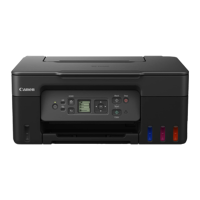
Do you have a question about the Canon PIXMA G3770 and is the answer not in the manual?
Ensure the printer is turned on before starting wireless connection setup. Verify the power indicator is lit.
Press the HOME button. Navigate to Settings using the arrow buttons.
Select LAN settings, Wi-Fi, Wi-Fi setup, and Manual connect options for network configuration.
Select your wireless router, enter the Wi-Fi password using the on-screen keyboard, and complete the entry.
Confirm the connection status to the wireless router and return to the HOME screen.
Go to the Canon website to download the printer driver and Master Setup (Mac) software.
Enter computer password to install helper tools and start the setup wizard.
Wait for software download, click 'Yes' to proceed, and agree to the license agreement terms.
Confirm printer power, wait for detection, select the printer from the list, and proceed.
Click 'Add Printer', select the specific printer model, and add it to the system.
Perform print head alignment if needed, wait for processing, and confirm driver installation completion.
 General
| Print Technology | Inkjet |
|---|---|
| Print Resolution | 4800 x 1200 dpi |
| Scanner Type | Flatbed |
| Ink Colors | 4 (Black, Cyan, Magenta, Yellow) |
| Supported Paper Sizes | A4, A5, B5, Letter, Legal, Envelopes (DL, COM10) |
| Copier Settings | Black and white, Color |
| Borderless Printing | Yes |
| Multiple Copy | Yes (up to 99 copies) |
| Functions | Print, Copy, Scan |
| Mobile Printing | Canon PRINT |
| Operating System Compatibility | Windows, macOS |
| Ink Type | Pigment Black and Dye Color Inks |



 To Next Page