EasyManua.ls Logo

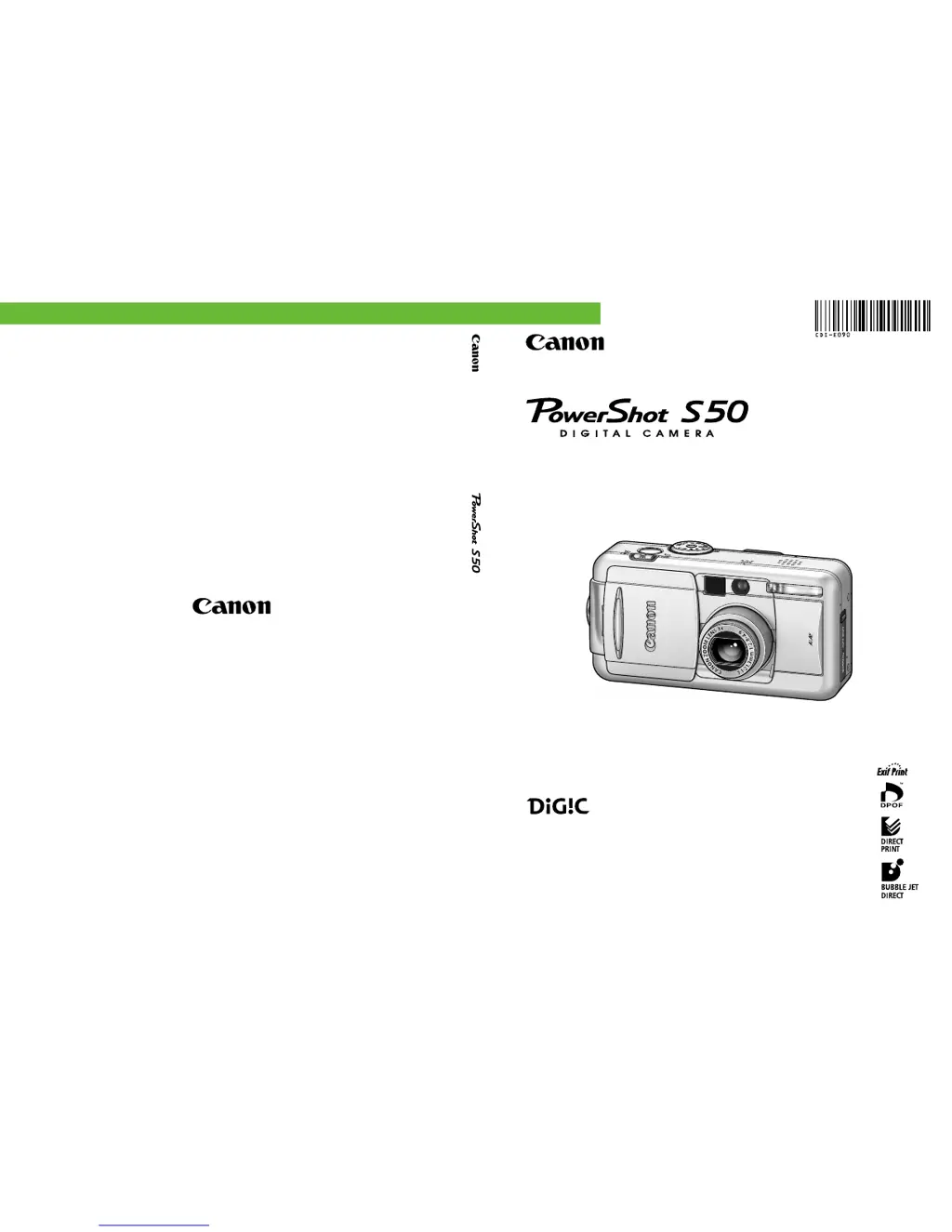
Canon PowerShot S50 - User Manual

Canon PowerShot S50
186 pages
Print Icon
To Next Page IconTo Next Page
Loading...
Camera User Guide
DIGITAL CAMERA
Camera User Guide
CDI-E090-010 XXXXXXX © 2003 CANON INC. PRINTED IN JAPAN
ENGLISH
Please start by reading the Precautions on page 4 of this manual.
Please refer to the Software Starter Guide for information on installing the
software and downloading images.
Please also read the printer user guide included with your Canon printer.

Table of Contents

Other manuals for Canon PowerShot S50

Questions and Answers

Summary

Important Introductory Information

Pre-Usage Guidance and Warnings

Covers test shots, copyright, warranty, and initial safety precautions.

Safety Warnings and Precautions

Critical Safety Warnings

Lists essential safety advice regarding eyesight, children, and liquids.

Quick Start Guide: Essential Setup Steps

Step 1-3: Battery and CF Card Installation

Guides for charging the battery and installing the CF card.

Step 4-5: Initial Camera and Mode Setup

Covers opening the lens cover and setting AUTO mode.

Camera Components Guide: Controls and Indicators

Camera Components Guide: Shooting Mode Dial

Preparing the Camera: Battery Charging

Charging the Battery Pack

Provides detailed steps for charging the camera's battery pack.

Preparing the Camera: Component Installation

Installing the Battery Pack

Step-by-step instructions for inserting the battery into the camera.

Preparing the Camera: CF Card Installation

Installing a CF Card

Guide for inserting the CompactFlash memory card correctly.

Preparing the Camera: Date;Time and Language Setup

Setting the Date; Time

Instructions for setting the camera's internal date and time.

Preparing the Camera: Language Settings

Setting the Language

Steps to change the display language of the camera menus.

Basic Camera Functions: Power Management

Turning the Power On; Off

Explains how to turn the camera on and off.

Basic Camera Functions: Mode Switching

Basic Camera Functions: LCD Monitor and Viewfinder

Basic Camera Functions: Menu Navigation

Selecting Menus and Settings

Guides on navigating menus and adjusting camera settings.

Basic Camera Functions: Shutter and Autofocus

Pressing the Shutter Button

Explains the two-stage action of the shutter button.

Basic Camera Functions: Zoom Operation

Basic Camera Functions: Menu System Access

Selecting Settings by Pressing the MENU Button

Details how to access and use the camera's menu system.

Customizing Camera Settings: My Camera

Changing My Camera Settings

Instructions to customize start-up images, sounds, and themes.

Customizing Camera Settings: Registering Customizations

Shooting Modes: Automatic and Scene Options

AUTO Auto Mode

Guide to using the automatic shooting mode for simple operation.

Shooting: Image Review and Format Settings

Changing Recording Format

Options for choosing between JPEG and RAW file formats.

Shooting Settings: Resolution and Compression

Changing Resolution and Compression

Guides on adjusting image resolution and compression levels.

Shooting Functions: Flash Usage

Using the Flash

Explains flash modes like Red-eye reduction and Slow Synchro.

Shooting Modes: Stitch Assist for Panoramas

Shooting Modes: Creative Exposure Control

Program AE (P)

Using Program AE for automatic shutter/aperture selection.

Shutter Speed Priority AE (Tv)

Setting shutter speed to control motion and light.

Aperture Priority AE (Av)

Setting aperture for depth of field control.

Manual Exposure (M)

Manually setting shutter speed and aperture.

Shooting Functions: Autofocus and Metering

Shooting Functions: Exposure Adjustments

Adjusting Exposure Compensation

Guides on using exposure compensation to adjust brightness.

White Balance Settings

Explains setting white balance for accurate colors.

Shooting Functions: Photo Effects and ISO Speed

Changing Photo Effects

Details applying effects like Vivid, Sepia, and B/W.

Changing ISO Speed

Explains adjusting ISO sensitivity for different lighting.

Advanced Shooting Functions: Bracketing

Auto Exposure Bracketing (AEB)

Guides on using AEB to take multiple shots with varying exposures.

Focus Bracketing (Focus-BKT)

Explains shooting multiple images with focus bracketing.

Advanced Shooting Functions: Exposure and Flash Locking

Flash Settings: Adjustments and Timing

Advanced Shooting Functions: Intervals and Autofocus

Custom Shooting Settings: Saving and Auto Rotate

Image Replay: Basic Viewing Functions

Image Replay: Advanced Viewing Features

Image Replay: Movies and Sound Annotations

Automated Playback: Slide Show Functionality

Image Protection and Erasure

Card Management: CF Card Formatting

Printing: Overview and Capabilities

Data Transfer to Computer

Camera Settings: Resetting to Default

Camera Care and Maintenance

Troubleshooting: Camera Operation Issues

Troubleshooting Camera Operation

Provides solutions for camera operation and recording problems.

Troubleshooting: Image and Focus Problems

Troubleshooting: Flash, Video, and Card Issues

Shooting Mode Functionality Overview

Functions Available in Each Shooting Mode

A chart detailing function availability across different shooting modes.

Summary

Important Introductory Information

Pre-Usage Guidance and Warnings

Covers test shots, copyright, warranty, and initial safety precautions.

Safety Warnings and Precautions

Critical Safety Warnings

Lists essential safety advice regarding eyesight, children, and liquids.

Quick Start Guide: Essential Setup Steps

Step 1-3: Battery and CF Card Installation

Guides for charging the battery and installing the CF card.

Step 4-5: Initial Camera and Mode Setup

Covers opening the lens cover and setting AUTO mode.

Camera Components Guide: Controls and Indicators

Camera Components Guide: Shooting Mode Dial

Preparing the Camera: Battery Charging

Charging the Battery Pack

Provides detailed steps for charging the camera's battery pack.

Preparing the Camera: Component Installation

Installing the Battery Pack

Step-by-step instructions for inserting the battery into the camera.

Preparing the Camera: CF Card Installation

Installing a CF Card

Guide for inserting the CompactFlash memory card correctly.

Preparing the Camera: Date;Time and Language Setup

Setting the Date; Time

Instructions for setting the camera's internal date and time.

Preparing the Camera: Language Settings

Setting the Language

Steps to change the display language of the camera menus.

Basic Camera Functions: Power Management

Turning the Power On; Off

Explains how to turn the camera on and off.

Basic Camera Functions: Mode Switching

Basic Camera Functions: LCD Monitor and Viewfinder

Basic Camera Functions: Menu Navigation

Selecting Menus and Settings

Guides on navigating menus and adjusting camera settings.

Basic Camera Functions: Shutter and Autofocus

Pressing the Shutter Button

Explains the two-stage action of the shutter button.

Basic Camera Functions: Zoom Operation

Basic Camera Functions: Menu System Access

Selecting Settings by Pressing the MENU Button

Details how to access and use the camera's menu system.

Customizing Camera Settings: My Camera

Changing My Camera Settings

Instructions to customize start-up images, sounds, and themes.

Customizing Camera Settings: Registering Customizations

Shooting Modes: Automatic and Scene Options

AUTO Auto Mode

Guide to using the automatic shooting mode for simple operation.

Shooting: Image Review and Format Settings

Changing Recording Format

Options for choosing between JPEG and RAW file formats.

Shooting Settings: Resolution and Compression

Changing Resolution and Compression

Guides on adjusting image resolution and compression levels.

Shooting Functions: Flash Usage

Using the Flash

Explains flash modes like Red-eye reduction and Slow Synchro.

Shooting Modes: Stitch Assist for Panoramas

Shooting Modes: Creative Exposure Control

Program AE (P)

Using Program AE for automatic shutter/aperture selection.

Shutter Speed Priority AE (Tv)

Setting shutter speed to control motion and light.

Aperture Priority AE (Av)

Setting aperture for depth of field control.

Manual Exposure (M)

Manually setting shutter speed and aperture.

Shooting Functions: Autofocus and Metering

Shooting Functions: Exposure Adjustments

Adjusting Exposure Compensation

Guides on using exposure compensation to adjust brightness.

White Balance Settings

Explains setting white balance for accurate colors.

Shooting Functions: Photo Effects and ISO Speed

Changing Photo Effects

Details applying effects like Vivid, Sepia, and B/W.

Changing ISO Speed

Explains adjusting ISO sensitivity for different lighting.

Advanced Shooting Functions: Bracketing

Auto Exposure Bracketing (AEB)

Guides on using AEB to take multiple shots with varying exposures.

Focus Bracketing (Focus-BKT)

Explains shooting multiple images with focus bracketing.

Advanced Shooting Functions: Exposure and Flash Locking

Flash Settings: Adjustments and Timing

Advanced Shooting Functions: Intervals and Autofocus

Custom Shooting Settings: Saving and Auto Rotate

Image Replay: Basic Viewing Functions

Image Replay: Advanced Viewing Features

Image Replay: Movies and Sound Annotations

Automated Playback: Slide Show Functionality

Image Protection and Erasure

Card Management: CF Card Formatting

Printing: Overview and Capabilities

Data Transfer to Computer

Camera Settings: Resetting to Default

Camera Care and Maintenance

Troubleshooting: Camera Operation Issues

Troubleshooting Camera Operation

Provides solutions for camera operation and recording problems.

Troubleshooting: Image and Focus Problems

Troubleshooting: Flash, Video, and Card Issues

Shooting Mode Functionality Overview

Functions Available in Each Shooting Mode

A chart detailing function availability across different shooting modes.

Canon PowerShot S50 Specifications

General IconGeneral
Camera typeCompact
Max resolution2592 x 1944
Image ratio w:h4:3
Sensor TypeCCD
ISO50, 100, 200, 400
Optical Zoom3x
Maximum aperturef/2.8 - f/4.9
Screen Size1.8"
Screen dots118, 000
Max shutter speed1/2000 sec
Min shutter speed15 sec
Image ProcessorDIGIC
Image StabilizationNo
Effective Pixels5.0 megapixels
Sensor size1/1.8"
Focal length (equiv.)35-105mm
Storage typesCompactFlash (Type I)
Video Resolution320 x 240
Battery TypeNB-2L

Related product manuals