Installing the Software and USB Driver
12
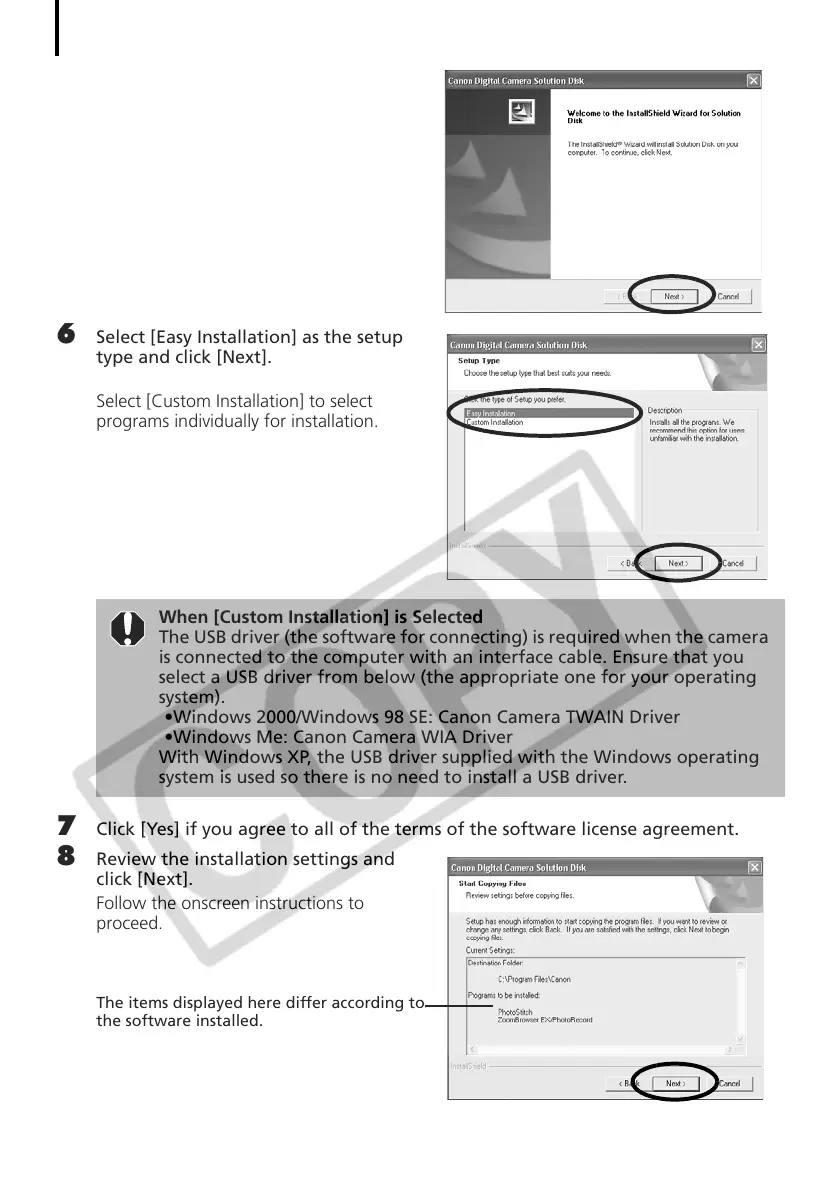
5 Click [Next].
6 Select [Easy Installation] as the setup
type and click [Next].
Select [Custom Installation] to select
programs individually for installation.
7 Click [Yes] if you agree to all of the terms of the software license agreement.
8 Review the installation settings and
click [Next].
Follow the onscreen instructions to
proceed.
The items displayed here differ according to
the software installed.
When [Custom Installation] is Selected
The USB driver (the software for connecting) is required when the camera
is connected to the computer with an interface cable. Ensure that you
select a USB driver from below (the appropriate one for your operating
system).
•Windows 2000/Windows 98 SE: Canon Camera TWAIN Driver
•Windows Me: Canon Camera WIA Driver
With Windows XP, the USB driver supplied with the Windows operating
system is used so there is no need to install a USB driver.



 To Next Page