26
Using the Software on the Windows
Platform – Advanced Techniques
This chapter explains various ZoomBrowser EX features.
Proceed to this chapter once you have mastered the basic ZoomBrowser EX procedures in the
Using the Software on the Windows Platform
– The Basics chapter.
The ZoomBrowser EX Windows
This section describes the principal ZoomBrowser EX windows: the Main Window, Viewer
Window and Properties Window.
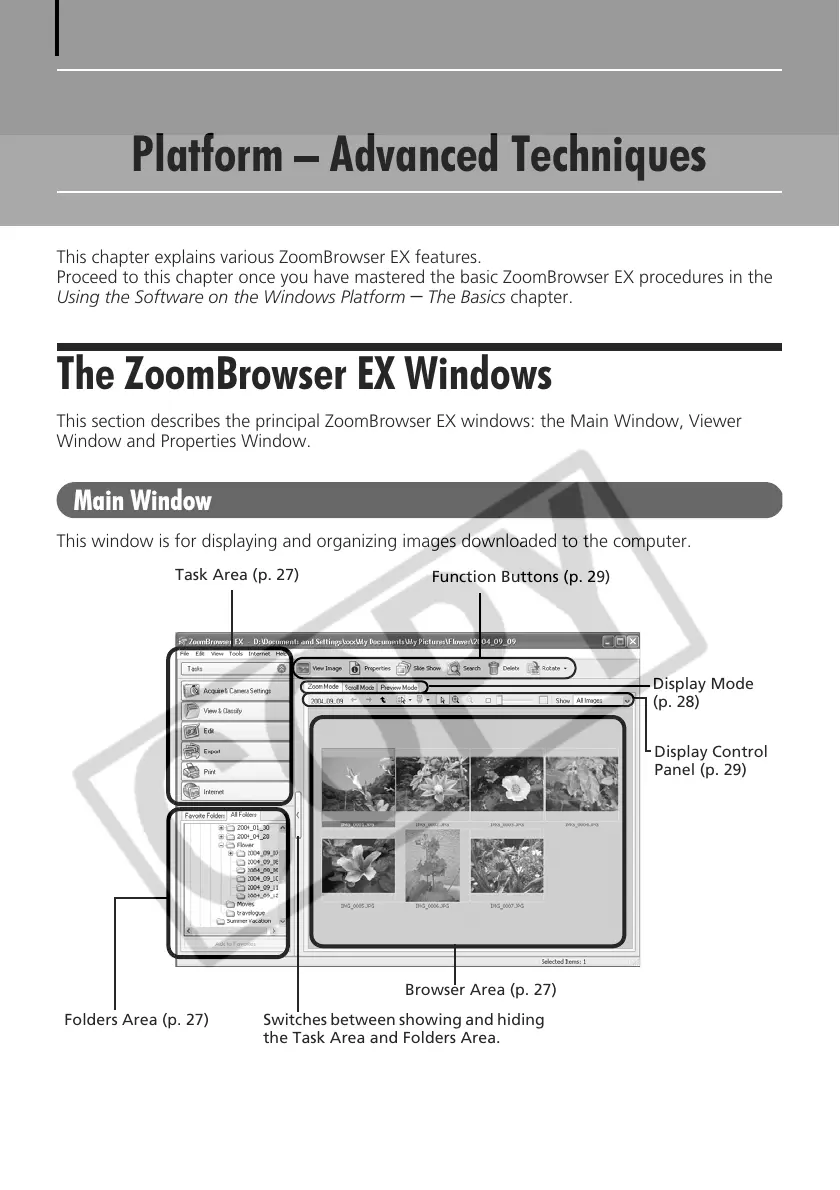
Main Window
This window is for displaying and organizing images downloaded to the computer.
Folders Area (p. 27)
Task Area (p. 27)
Browser Area (p. 27)
Function Buttons (p. 29)
Switches between showing and hiding
the Task Area and Folders Area.
Display Mode
(p. 28)
Display Control
Panel (p. 29)












 To Next Page