Downloading Images to the Computer
16
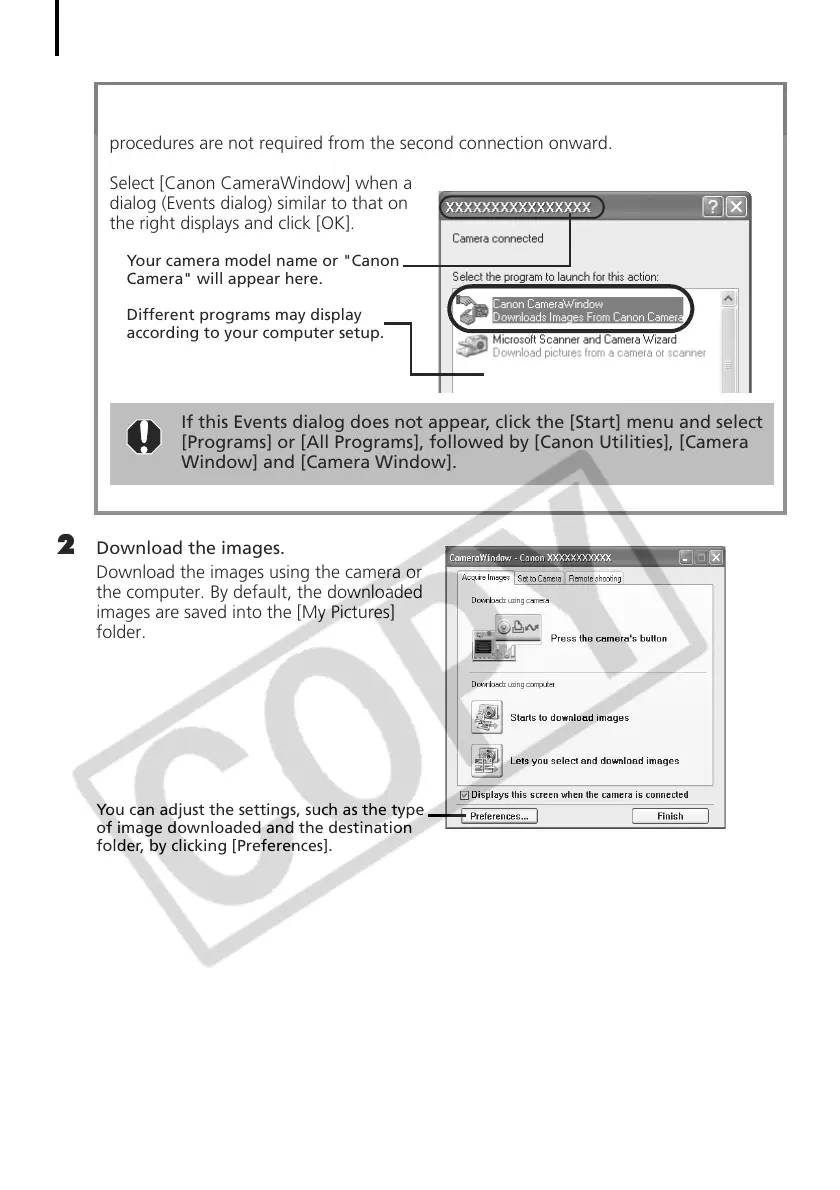
2 Download the images.
Download the images using the camera or
the computer. By default, the downloaded
images are saved into the [My Pictures]
folder.
You can adjust the settings, such as the type
of image downloaded and the destination
folder, by clicking [Preferences].
First Time Camera is Connected to a Computer
Set the following settings the first time you connect the camera to the computer. These
procedures are not required from the second connection onward.
Select [Canon CameraWindow] when a
dialog (Events dialog) similar to that on
the right displays and click [OK].
Your camera model name or "Canon
Camera" will appear here.
Different programs may display
according to your computer setup.
If this Events dialog does not appear, click the [Start] menu and select
[Programs] or [All Programs], followed by [Canon Utilities], [Camera
Window] and [Camera Window].



 To Next Page