EasyManua.ls Logo

Canon TL - Aperture Control

Canon TL
40 pages
Print Icon
To Next Page IconTo Next Page
To Previous Page IconTo Previous Page
Loading...
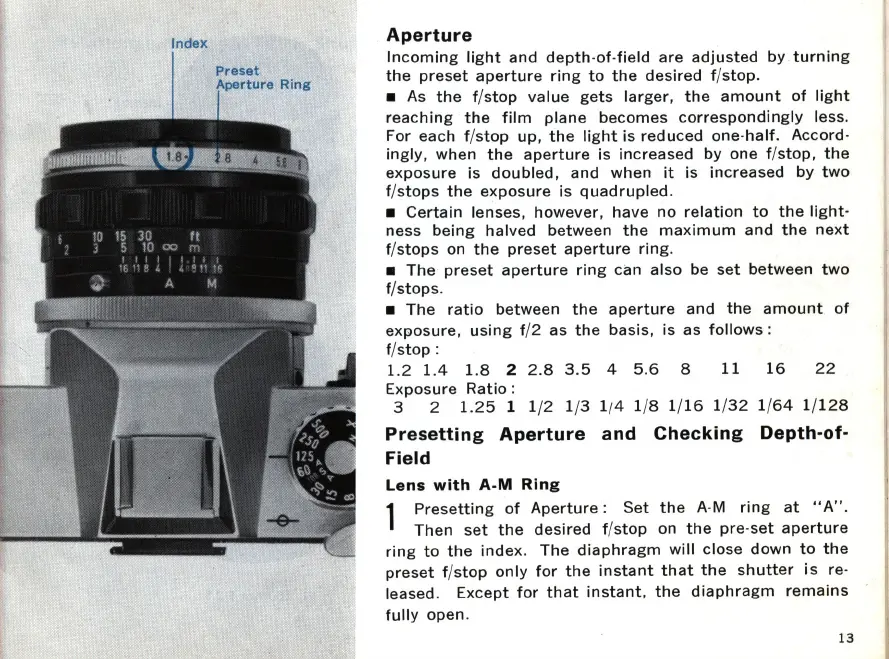
Index
Preset
Aperture
Incoming
light
and
depth
-
of
-
field
are
adjusted
by
turning
the
preset
aperture
ring
to
the
desired
f/stop_
As
the
f/
stop
value
gets
larger,
the
amount
of
light
reaching
the
film
plane
becomes
correspondingly
less_
For each f/
stop
up,
the
light
is
reduced
one-
half
_ Accord-
ingly
,
when
the
aperture
is
increased
by
one f/
stop,
the
ex
posure
is
doubled
,
and
when
it
is
increased
by
two
f/
stops
the
exposure
is
quadrupled
_
Certain
lenses,
however,
have
no
relation
to
the
light-
ness
being
halved between
the
ma
x
imum
and
the
next
f/
stops
on
the
preset
aperture
ring
_
The
preset
aperture
ring
can
also
be
set
between
two
f/stops_
The
ratio
between
the
aperture
and
the
amount
of
exposure
,
using
f/2 as
the
basis
, is as
follows
:
f/
stop
:
1.2
1.4
1.8
2 2 _8 3 _5 4 5_6 8
11
16
22
Exposure
Ratio
:
3 2
1.25
1 1/2 1/3 1/4 1/8 1/
16
1/
32
1/
64
1/
128
Presetting
Aperture
and
Checking
Depth-of-
Field
Lens
with
A-M
Ring
1
Presetting
of
Aperture:
Set
the
A-M
ring
at
" A"_
Then
set
the
desired
f/
stop
on
the
pre
-
set
ape
r
ture
ri
ng
to
the
index_
The
diaphragm
will
close
down
to
the
preset
f/
stop
only
for
the
instant
that
the
shutter
is
re-
leased_
Except
for
that
instant
,
the
diaphragm
remains
fully
open_
13

Other manuals for Canon TL

Related product manuals