1
ENGLISH
Setting Up the Printer
1. Box Contents
•
FINE Cartridges
Color Black
•
Power Cord
•
Safety and Important Information
•
Getting Started (this manual)
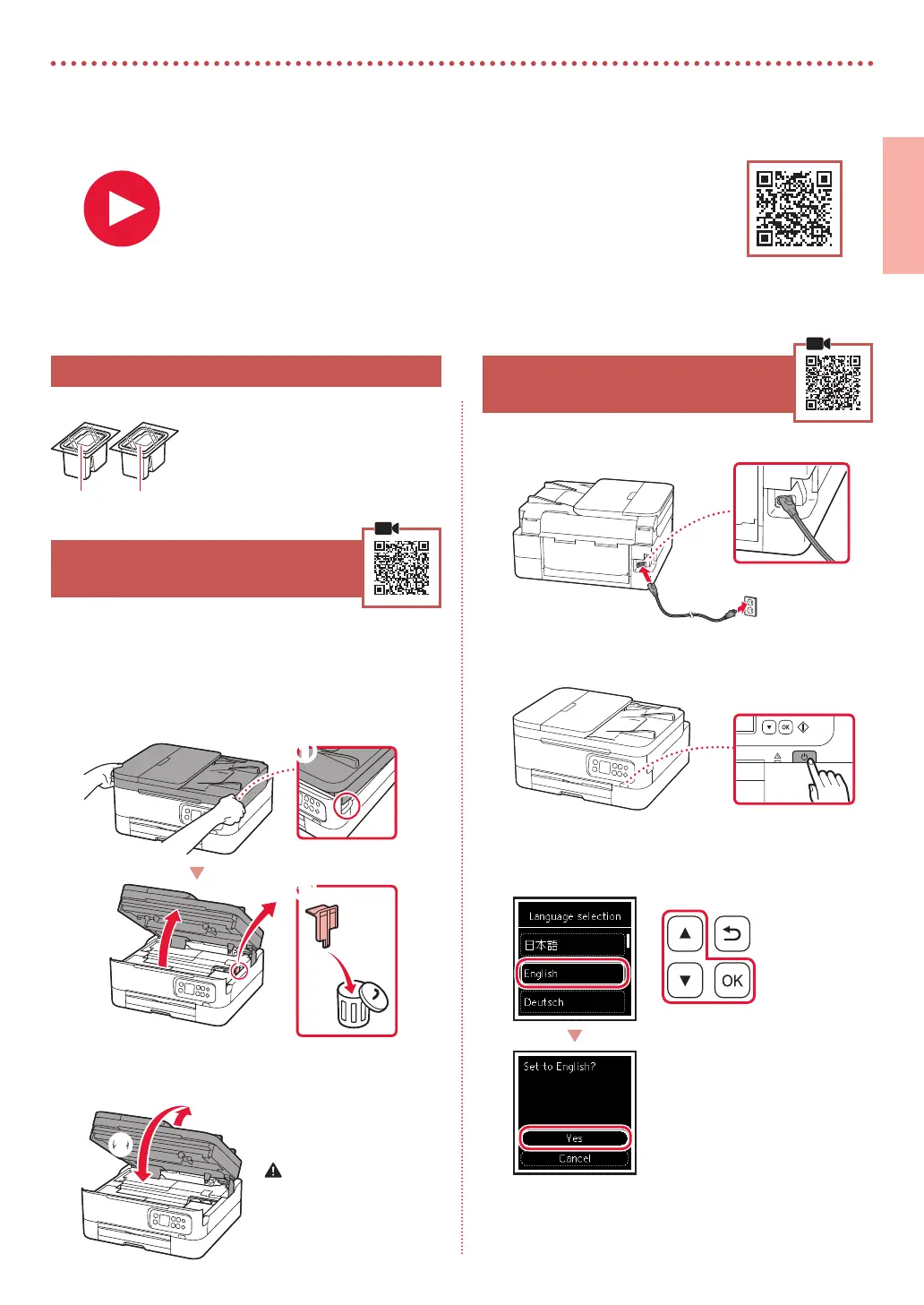
2. Removing Packing Materials
1
Remove and dispose of any packing materials
and orange tape.
2
Open the scanning unit / cover, remove and
dispose of the orange tape and protective
material inside.
b
a
3
Close the scanning unit / cover.
•
Open the scanning unit / cover fully and then close it.
Caution
Watch your ngers.
a
b
3. Turning on the Printer
1
Connect the power cord.
Back
2
Press the ON button.
3
Use the { and } buttons to select a language,
and then press the OK button.
For Setup, visit the URL
https://ij.start.canon/TR7020
or scan the code with your mobile device
•
For users without an Internet-connected environment, follow the instructions below.



 To Next Page