EasyManua.ls Logo

Cantrack G200 - Command List

Cantrack G200
6 pages
Print Icon
To Next Page IconTo Next Page
To Previous Page IconTo Previous Page
Loading...
4
4
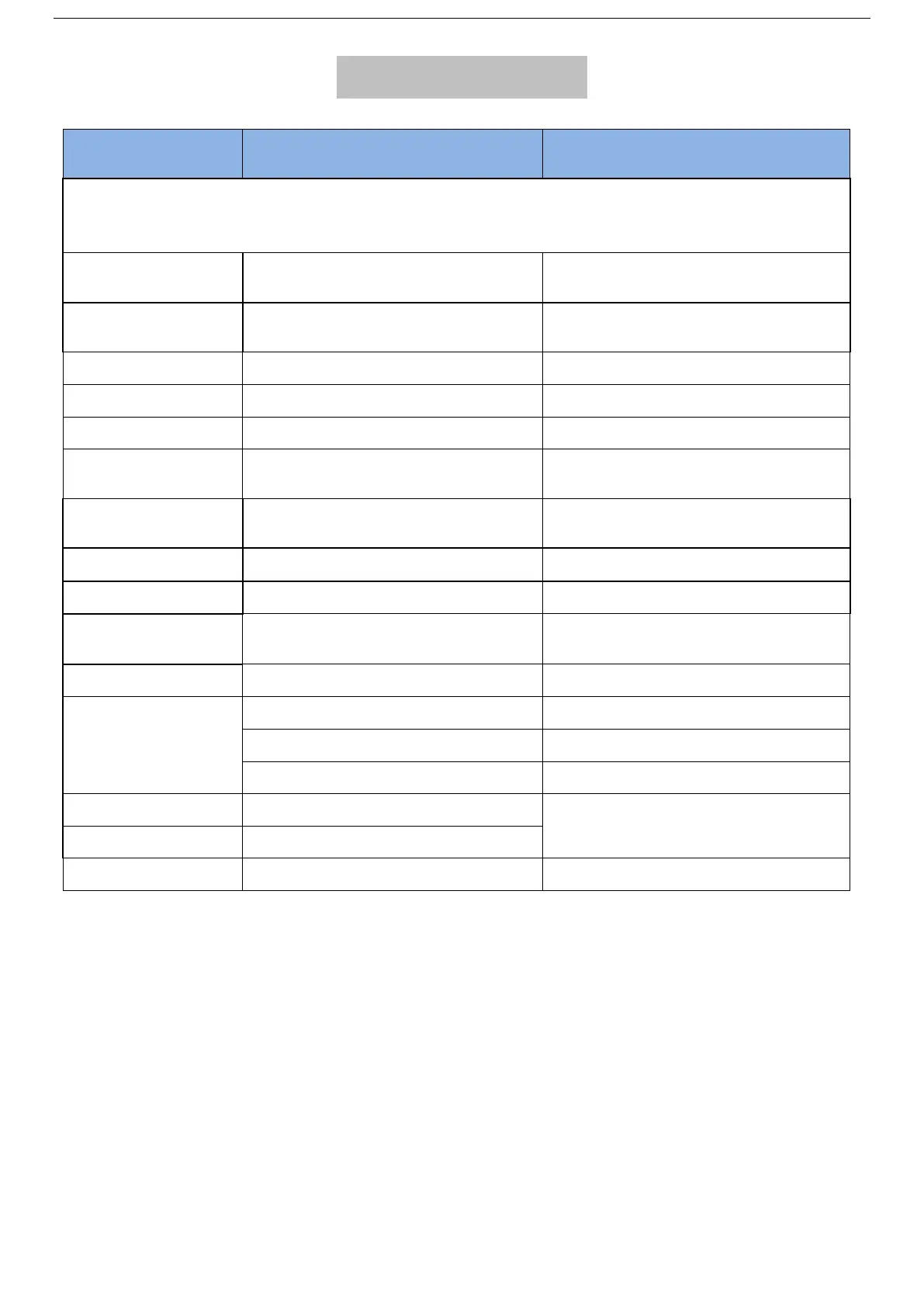
COMMAND LIST
SMS Function
SMS Command format
Please don’t type “+” “space”, password 123456
Preset Center Number first before testing SMS or Phone Call alarm mode.
Each SMS must replyOK represent command successfully.
Step 1 Set IP Port
adminip+password+space+IP
Address+space+port number
adminip123456 www.gps2828.com 7018
Step 2 Set APN
apn123456+space+LocalApn+space
+ApnName+space+ApnPassword
apn123456 tim.br tim tim
Set fall-off alarm
remove123456+space+1
remove123456 1
Cancel fall-off alarm
remove123456+space+0
remove123456 0
Set Time Interval
ITV123456+space+time interval(s)
If 60s , send SMS: ITV123456 60
Set center number
centernum123456+space+phone
number
centernum123456 13712345678
no need put country code
Cancel center
number
centernum123456
Set low battery alarm
lowbat123456+space+1
lowbat123456 1
Cancel low battery
lowbat123456+space+0
lowbat123456 0
Set SMS time zone
timezone123456+space+(timezone*
60)
If+5.5:timezone123456 330
Check device status
check123456
check GPS GSM status
Set alarm mode
KC123456+space+1
APP alarm (default)
KC123456+space+2
APP+SMS alarm
KC123456+space+3
APP+SMS+PhoneCall alarm
Set vibrate alarm
vibrate123456+space+1
Must keep continuously static 3 minutes
before vibration
Cancel vibrate alarm
vibrate123456+space+0
Set factory mode
begin123456
It will erase all setting
* Note: Fall-off alarm: device sticking to the metal cover with magnet, fall-off alarm
will be triggered once device was removed off.

Related product manuals